Why one-off data scripts keep breaking in production
Most teams have the same story: a quick notebook cleans a CSV, backfills a table, or calls a third-party API. It works once, then someone asks to “run it weekly,” “add one more source,” or “turn it into an endpoint.” The script stays in a personal workspace, dependencies drift, credentials get copied into code, and retries or partial failures create inconsistent data.
A more reliable approach is to treat “one-off” scripts as small production services: versioned, testable, parameterized, observable, and runnable both on a schedule and via an API. This doesn’t require turning everything into a full microservice; it requires a repeatable pattern and a platform that supports code-first execution, secrets, and operations.
A production-ready pattern for shipping notebook logic
The goal is to take notebook logic (exploration + transformation + output) and rewrite it into a minimal job that can run unattended. The pattern below stays lightweight while creating guardrails that prevent the most common failures.
1) Extract the core logic into a pure function
Notebooks tend to mix IO (reading files, fetching from APIs, writing to databases) with transformations. Start by extracting transformation logic into a function that:
- Takes explicit inputs (dataframes, lists, rows, config values)
- Returns explicit outputs (records to write, metrics, summaries)
- Has no hidden state (no global variables, no implicit environment)
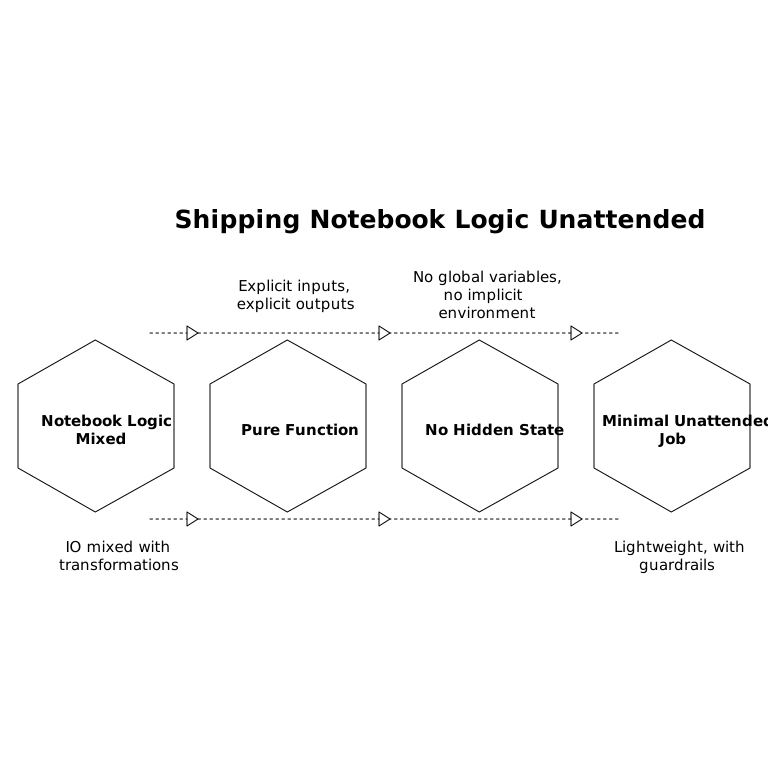
This makes testing straightforward and keeps behavior stable as the surrounding execution environment changes.
2) Wrap side effects behind small adapters
Create thin modules for external interactions: database reads/writes, file storage, and API calls. Keep them replaceable so tests can swap in fakes. In practice this means:
- A repository for database access (read inputs, write outputs)
- A client for each API with timeouts, retries, and pagination
- A storage adapter for S3/GCS/local files
When failures happen, you can pinpoint whether the bug is in transformation logic or an external dependency.
3) Define a stable interface with typed parameters
“Run it again” is rarely identical: teams need date ranges, dry runs, customer scopes, or flags for backfills. Expose parameters explicitly rather than editing code each time. At a minimum, define:
- run_date or start/end windows
- dry_run to validate without writing
- batch_size for large backfills
- idempotency_key or a natural key strategy
This interface becomes the contract for both scheduled runs and API-triggered runs.
4) Add two layers of tests: fast unit tests and a single integration check
For one-off data scripts, you don’t need an exhaustive test suite, but you do need confidence that refactors and dependency updates won’t silently change outputs.
- Unit tests for the pure function with small fixture inputs and expected outputs
- Integration smoke test that exercises the full job against a test database/schema or mocked API responses
Make the integration test minimal: one happy path run and one failure-mode run (e.g., API returns 429, DB insert fails). The purpose is to validate wiring and error handling, not to replicate production.
5) Make runs observable with structured logs and metrics
Notebook prints don’t scale. In production, you need logs that answer: what was processed, how long it took, and what failed. Use structured logs (JSON fields) for:
- Input parameters and version identifier
- Row counts in/out, dedupe counts, and skipped records
- Per-step timings
- Error categories (network, validation, constraint violation)
If your data affects downstream systems (CRM updates, marketing sends, billing), add an explicit “summary payload” output so reviewers can verify impact before reruns. If the script touches customer or sales data, it pairs well with a field-level sync review process like this CRM sync checklist.
6) Enforce idempotency and safe retries
Scheduled jobs and webhooks will rerun. Plan for it. Common strategies:
- Upserts using stable natural keys
- Write-ahead markers (e.g., record processed IDs in a checkpoint table)
- Deterministic output paths for files keyed by run window
Also decide what “partial success” means. For example: should a single bad record fail the whole run, or should it be quarantined into a dead-letter table?
Turning the same script into a scheduled job and an API
Once the code has a stable parameter interface and predictable side effects, exposing it as a job and as an endpoint becomes an execution detail rather than a rewrite.
Scheduled execution
For scheduled runs, the operational needs are: concurrency control, worker isolation, secrets, and alerting. Typical requirements include:
- Prevent overlapping windows (e.g., don’t run a backfill and a daily run simultaneously)
- Pin dependencies or use reproducible environments
- Send alerts with enough context to triage (parameters, step, error)
This is where platforms that manage execution and monitoring can reduce glue code. With windmill.dev, teams can author scripts in multiple languages, run them on schedules, manage secrets centrally, and keep runs observable with logs and alerts—without turning every script into a standalone service. The key is still the code structure: a clean core function plus adapters.
API-triggered execution
API mode is useful for event-driven tasks: rerun a customer, process a webhook payload, or kick off an on-demand backfill. When you expose the script as an endpoint, define:
- Authentication and authorization (who can trigger, what scopes)
- Rate limits and input validation
- Synchronous vs asynchronous response behavior
- Run receipts: return a run ID and a linkable log trail
Keep the endpoint thin: it should validate inputs, enqueue or run the job, then return a reference to execution details.
Versioning that actually works for data scripts
Versioning is not just “git commit exists.” For data jobs, you want to know exactly what code and configuration produced a given output.
- Code version: commit SHA or a tagged release
- Dependency version: lockfile, pinned container image, or managed dependency set
- Config version: parameters captured per run
- Data version (when feasible): input snapshot identifiers or table partition references
Attach these to every run record. If a stakeholder asks why numbers changed between Tuesday and Wednesday, you can answer with concrete diffs rather than guesses.
Common failure modes and how the pattern prevents them
- “It worked in my notebook”: eliminated by reproducible dependencies and explicit parameters.
- Silent schema drift: caught by integration smoke tests and input validation.
- Duplicate writes after retries: prevented with idempotent upserts and checkpoints.
- Unclear ownership: reduced by versioned runs, logs, and alert routing.
When the script’s output feeds operational workflows—like creating issues or action items—standardizing handoffs matters as much as the code. If engineering decisions flow from code reviews into execution work, the same “structured output” mindset applies to process artifacts too, similar to a PR-to-issue workflow like turning code review decisions into sprint-ready items.
Frequently Asked Questions
How does windmill.dev help move a notebook script into production safely?
windmill.dev provides a code-first runtime with scheduling, endpoint exposure, secrets management, and run logs, so the same script can be executed reliably without building custom infrastructure around it.
What’s the minimum testing setup for a data script running on windmill.dev?
Use unit tests for the pure transformation function plus one integration smoke test that runs the full script against a test database or mocked API. windmill.dev then runs the versioned script consistently on schedules or via API.
How do I ensure idempotent reruns when exposing a script as an API on windmill.dev?
Design for upserts on stable keys, add checkpoints for processed records, and capture an idempotency key in parameters. When triggered through windmill.dev, keep a run ID and logs so reruns are traceable.
What parameters should I standardize before scheduling a script in windmill.dev?
At minimum: a date window (run_date or start/end), dry_run, batch_size, and a scope filter (tenant/customer ID). windmill.dev can surface these parameters for scheduled runs and endpoint calls.
How should secrets and credentials be handled for scripts executed in windmill.dev?
Store credentials in windmill.dev’s secret management and pass them to scripts at runtime rather than hardcoding them or relying on a developer’s local environment, reducing leakage and drift.