Why transcript-to-CRM hygiene matters more than “good notes”
Sales teams rarely lose deals because a rep forgot a detail. They lose deals because the system of record drifts away from reality: stages don’t match what was agreed, next steps aren’t dated, stakeholders aren’t logged, and key risks live only in someone’s memory. “Pipeline hygiene” is the discipline of keeping your CRM aligned with what actually happened in customer conversations—at a field level, consistently, and without relying on manual note-taking after every call.
Modern AI meeting tools make this achievable. Instead of expecting reps to transcribe, summarize, and retype updates into multiple objects, you can start from the most accurate source available: the call recording and transcript. Tools like Fathom capture the conversation, generate structured summaries and action items immediately after the meeting, and support integrations and automation so CRM updates can be standardized rather than improvised.
The field-level CRM sync checklist for sales calls
This checklist is designed to help you define exactly what should be updated after a sales call, where it should live in your CRM, and how to verify it was captured correctly. Use it as a template and tailor it to your sales motion (SMB transactional vs. enterprise, inbound vs. outbound, trials vs. demos).
1) Contact and account basics are correct (identity hygiene)
Before you sync “what was said,” make sure “who said it” is right.
- Attendees mapped to CRM records: The decision maker, champion, evaluator, procurement, and technical lead should each be linked to the right Contact.
- New contacts created intentionally: If someone joined who isn’t in the CRM, define rules for when to create a net-new Contact vs. when to ignore (e.g., external consultants, agency partners).
- Account association verified: Multi-entity orgs and subsidiaries are common sources of contamination. Confirm the Opportunity is tied to the correct Account.
Transcript-based systems help here by consistently capturing names and context. Where your tooling supports it, use custom vocabulary (product names, unusual surnames) to reduce mislabeling.
2) Activity logging is consistent and searchable (timeline hygiene)
CRMs become unreliable when activities are logged differently across reps. Define a minimum activity standard per call.
- Meeting logged as an activity: Date/time, call type (discovery, demo, pricing, security review), and participants.
- Recording/transcript reference: A link back to the source improves auditability and coaching. If your process allows it, store highlight clips for key moments (pricing, objections, commitments).
- Standard tags or keywords: Use a small controlled vocabulary like “Competition,” “Security,” “Pricing,” “Timeline,” “Use case.”
With an AI notetaker, global search across transcripts and keyword alerts can act as a safety net: when a term like “legal review” or a competitor name shows up, the team can confirm the CRM reflects it.
3) Opportunity stage and forecast fields reflect the call outcome
The most valuable CRM updates are the ones that influence forecast accuracy. Treat these as “must confirm” fields after every meaningful customer call.
- Stage: Updated only when the call produced evidence that stage criteria were met (not because time passed).
- Close date: Set to a realistic date based on stated timeline, not internal hope.
- Amount and pricing model: Updated when scope changes, seats change, or packaging shifts.
- Probability / forecast category: Adjusted when new risks appear or commitments are made.
A simple control: require that any stage change is accompanied by one supporting sentence sourced from the call summary (e.g., “Security review scheduled for April 12; procurement engaged”).
4) Next steps are explicit, owned, and dated (execution hygiene)
“Send follow-up” is not a next step. A clean pipeline is driven by clean commitments.
- Mutual next step: What both parties agreed will happen next.
- Owner: Customer owner vs. seller owner (or both).
- Due date: A date, not “next week.”
- Dependency: If your next step depends on the customer doing something first, capture that dependency.
Teams that struggle here usually don’t have a consistent post-call ritual. A short standard operating procedure—like a 10-minute agenda-to-actions routine—helps ensure action items become scheduled work rather than forgotten text. If you want a lightweight model, see a 10-minute agenda-to-actions ritual.
5) Stakeholders, roles, and influence are updated after every multi-person call
Stakeholder mapping is often outdated within days. After each call, update:
- Role labels: Decision maker, champion, blocker, technical approver, economic buyer.
- Influence and sentiment: Positive/neutral/negative based on what was said.
- Gaps: Who still needs to be involved (security, finance, end users).
Transcript-based summaries are useful because they capture direct objections and support requests. That makes it easier to document “why someone is hesitant” rather than guessing.
6) Risks, objections, and constraints are captured in structured fields
If these live only in free-form notes, they won’t roll up to dashboards or coaching.
- Top 1–3 objections: Pricing, timing, integration effort, change management, vendor risk.
- Constraints: Budget cycle, procurement rules, security requirements, technical dependencies.
- Competitors: Mentioned vendors and the specific comparison points raised.
Where your tooling supports it, use AI-generated call summaries as the raw material, then map into consistent picklists or structured text fields so reporting remains clean.
7) Use cases and success criteria are updated for qualification
Qualification frameworks vary, but the CRM needs a consistent record of “what value they expect and how they’ll judge it.”
- Primary use case: The scenario they care about most.
- Success metrics: Time saved, adoption target, error reduction, revenue impact.
- Proof requirements: Pilot/trial needs, references, security documentation, integration validation.
This is also where “Ask” workflows shine: being able to query prior calls for “what did they say success looks like?” can prevent teams from drifting away from the customer’s stated goals as the deal ages.
8) Follow-ups are consistent across channels (email + tasks + CRM)
Many teams log notes in one place, tasks in another, and follow-up emails somewhere else. The result is partial visibility.
- CRM task created for each seller-owned action: Not just a note.
- Customer deliverables tracked: Documents requested, security questionnaires, pricing proposals.
- Shared visibility: The rest of the team can see what’s pending without asking the rep.
If your organization struggles to turn meeting output into artifacts that other teams can use (solutions engineering, product, leadership), a structured approach to transforming notes into diagrams and decision-ready documentation can help. The workflow in this 15-minute decision-diagram process is a practical complement to CRM syncing when deals have complex requirements.
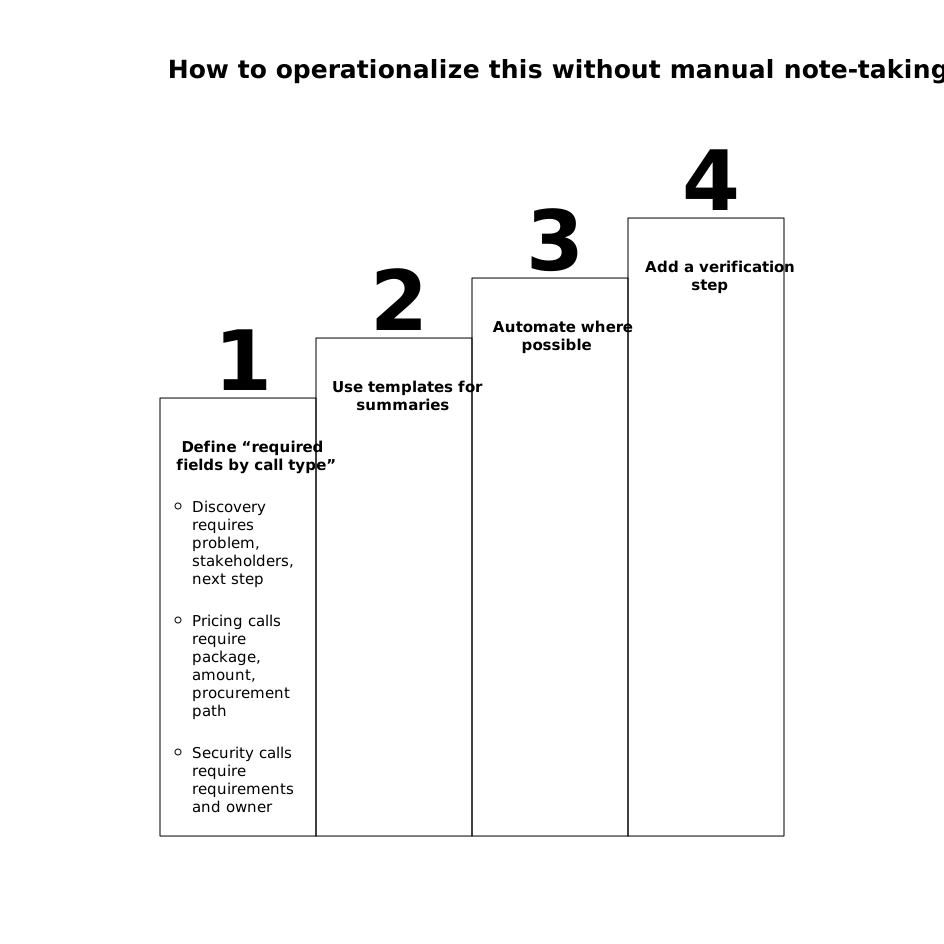
How to operationalize this without manual note-taking
The point of the checklist is standardization, not more admin work. To operationalize it:
- Define “required fields by call type”: Discovery requires problem, stakeholders, next step; pricing calls require package, amount, procurement path; security calls require requirements and owner.
- Use templates for summaries: Keep sections consistent (outcomes, decisions, risks, next steps). This makes mapping to CRM fields predictable.
- Automate where possible: Sync meeting summaries and action items into your CRM and collaboration tools, then review only the fields that impact forecast and execution.
- Add a verification step: A quick manager or rep self-check: stage, close date, next step date, primary risk. If those four are right, pipeline hygiene improves dramatically.
AI meeting partners like Fathom fit naturally into this approach because they focus on accurate transcripts, immediate structured outputs, and integrations that reduce retyping. The goal isn’t to flood your CRM with text—it’s to keep a small set of high-value fields consistently aligned with what the customer actually said.
Frequently Asked Questions
How can Fathom help keep Salesforce or HubSpot fields up to date after a sales call?
Fathom produces a transcript, structured summary, and action items immediately after the meeting, which you can sync or automate into CRM records so key fields (stage, next steps, risks) don’t rely on manual retyping.
What CRM fields should I prioritize syncing from Fathom summaries?
Start with the fields that affect forecast and execution: opportunity stage, close date, amount/pricing, next step (owned and dated), top risks/objections, and key stakeholders. Expand to use case and success criteria once the basics are consistent.
How do I prevent messy “note dumps” when using Fathom with a CRM?
Use a consistent summary template and map specific sections to specific fields (e.g., decisions to a “Decision” field, objections to a “Risks” field). Keep the full transcript link available for auditability, but store only what’s operationally useful in structured CRM fields.
Can Fathom support coaching and pipeline reviews beyond CRM updates?
Yes. Fathom’s searchable transcripts, highlights, and team visibility features can help managers validate what was agreed on a call, spot common objections, and review moments that influenced stage changes or forecast shifts.
What’s a simple quality check to run after syncing notes with Fathom?
Confirm four items match the call outcome: stage, close date, the single most important next step with a due date, and the primary risk. If those are correct, pipeline hygiene typically improves even if other fields are imperfect.