What a 24-hour triage SLA actually solves
A “triage SLA” is a commitment to make a decision on every new issue within a defined window (here: 24 hours), not to fix every issue within 24 hours. That distinction is what prevents the system from becoming an engineering time sink.
Teams that don’t set a decision window tend to accumulate three hidden costs: (1) duplicate reports and noisy back-and-forth, (2) context loss while the issue waits for “someone” to look at it, and (3) unplanned interruptions when urgent items finally surface late. A 24-hour decision SLA reduces those costs by ensuring every incoming item quickly gets a status, a next step, and an owner—while keeping deep investigation explicitly optional.
Define the SLA in terms of decisions, not work
The playbook works when the SLA is defined as “every new issue receives a triage outcome within 24 hours on business days.” The outcome should be one of a small set of choices that are easy to apply consistently:
- Accept: it’s a real problem/request; it enters the backlog with priority and routing.
- Need info: missing reproduction steps, environment details, logs, or user impact; ask once, clearly.
- Duplicate: link to the canonical issue and close or merge.
- Won’t do / not a bug: record rationale to avoid re-triage later.
- Escalate: it meets “stop the line” criteria; page the right on-call or incident channel.
Keeping outcomes limited avoids debates that turn triage into mini-planning. The goal is a reliable first decision, not perfect prioritization.
Set up intake so issues arrive pre-sorted
A triage SLA collapses if everything lands in one undifferentiated queue. Instead, structure intake so most issues arrive with enough context to decide quickly.
Use a single “front door” with required fields
Whether reports come from Slack, email, a support tool, or a feedback widget, route them into one system with consistent fields: product area, environment, user impact, steps to reproduce, expected vs. actual behavior, and links to logs or sessions. If you’re feeding issues from sales calls or customer conversations, consider cleaning that data upstream; a checklist approach like a field-level CRM sync checklist can reduce vague, low-signal tickets that burn triage time.
Create two queues, not one
- Untriaged: new items waiting for the 24-hour decision.
- Needs info / pending: items blocked on external details, so they don’t pollute the “decision” queue.
This separation keeps the SLA measurable. If “untriaged” is never empty, you know you’re missing capacity or clarity.
Define what “within 24 hours” means in practice
Be explicit about time boundaries. Most teams mean: “within 24 hours on business days,” or “by end of next business day.” Write it down so there’s no confusion during weekends, holidays, or after-hours launches.
Also define what counts as “triaged.” A comment that says “looking” doesn’t count. A triage decision should create an observable state change: status update, label, owner, next action, and (if needed) a follow-up question.
Roles and permissions that prevent engineering overload
To protect engineering time, triage should be shared but not chaotic. A lightweight model that works well:
- Triage captain (rotating): owns the SLA for the day/week, clears the untriaged queue, and enforces standards.
- Domain reviewers: engineers or PMs who answer targeted questions when the captain escalates a decision.
- Support/product ops: handle “need info” loops, reproduction requests, and customer follow-ups.
This preserves a single accountable person for the queue while avoiding the trap of “everyone is responsible,” which usually means no one is.
A 15-minute daily triage ritual that scales
Many teams can meet a 24-hour decision SLA with a short daily cadence:
- Morning sweep (10–15 minutes): the triage captain processes new items, applies an outcome, and assigns owners only when necessary.
- Midday check (5 minutes): confirm that escalations and “need info” requests have moved forward.
- End-of-day buffer (5 minutes): ensure nothing is aging out untriaged.
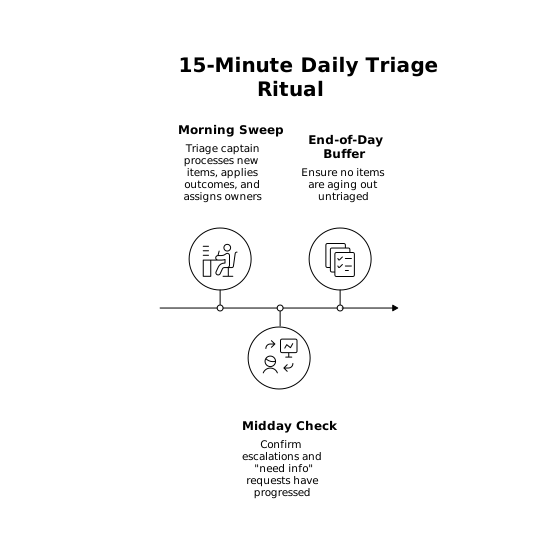
When the queue spikes, the ritual still holds: you adjust the decision quality and level of investigation, not the commitment to decide.
Make “good enough” decisions with a standard rubric
The fastest way to burn engineering time is to turn triage into detective work. A rubric keeps decisions consistent without requiring deep analysis:
- Impact: how many users, revenue, or critical workflows are affected?
- Urgency: is it actively happening now or likely to recur soon?
- Confidence: do we have a reliable repro, logs, or clear screenshots?
- Workaround: can support or users bypass it safely?
High impact + high urgency + high confidence is the obvious escalation path. Low confidence becomes “need info.” The key is that every outcome is actionable and recorded.
Use workflow states that reflect decisions
A modern issue tracker should encode the triage decision in workflow states and labels so anyone can interpret status at a glance. This is where a structured tool like linear.app fits naturally: fast intake, clear states, and predictable routing help teams keep the decision SLA without building a heavy process layer.
Regardless of tool, aim for states that map to the SLA:
- New / Untriaged
- Needs info
- Accepted (with priority)
- Escalated (incident/on-call path)
- Closed (duplicate / won’t do / not reproducible)
Avoid adding too many intermediate states early. Complexity increases the surface area for disagreement and slows decisions.
Stop re-triage with better context and canonical threads
Re-triage happens when the same issue gets reported in different channels and nobody can tell what was already decided. Two practices help:
- Canonical issue linking: duplicates should always reference the original issue and inherit its decision.
- Decision logs: when triage decisions are discussed in chat, capture the outcome in a durable place so it doesn’t vanish in scrollback.
If your team frequently makes decisions inside Slack threads, a system like turning meeting transcripts into auto-updated decision logs can reduce repeated debates and keep triage outcomes searchable.
Metrics that prove the SLA is working
Keep measurement simple and tied to outcomes:
- Time to triage decision: median and 90th percentile.
- Untriaged queue age: count of items older than 24 hours.
- Need-info rate: high rates indicate intake forms or reporter guidance need improvement.
- Duplicate rate: high rates suggest discoverability issues (or a recurring bug).
If the SLA fails, treat it like a capacity and design problem: reduce intake noise, tighten required fields, or rotate triage ownership more frequently. Don’t “solve” it by pulling more engineers into ad-hoc investigation.
Common failure modes and how to avoid them
- The SLA becomes a fix promise: prevent this by documenting that the SLA is about decisions, not delivery dates.
- Everything is labeled urgent: define escalation criteria (security, outages, data loss, payments) and enforce them.
- Need-info turns into a graveyard: add a follow-up deadline and close items that don’t get the required details.
- Triage captain becomes a bottleneck: keep outcomes lightweight and escalate only targeted questions, not full investigations.
Frequently Asked Questions
How can Linear help enforce a 24-hour triage SLA?
Linear can make the SLA observable by keeping an Untriaged queue, decision-focused workflow states (Needs info, Accepted, Escalated), and clear ownership so every new issue gets a recorded outcome within the window.
What should count as “triaged” in a Linear workflow?
In Linear, “triaged” should mean a concrete state change plus a next step—such as marking an issue Accepted with a priority, moving it to Needs info with a specific question, closing as Duplicate with a link, or Escalating to the incident path.
How do we avoid engineers spending hours investigating during triage in Linear?
Use Linear triage outcomes that are decision-oriented, not investigative: accept, need info, duplicate, won’t do, escalate. Reserve deep debugging for scheduled work after the initial decision is logged.
What escalation criteria should we document alongside a Linear triage SLA?
Document a small “stop the line” list tied to real risk—outage, data loss, security, payments, or widespread customer impact—then use a dedicated Escalated state/label in Linear to route it to on-call or incident handling.
How do we measure whether the triage SLA is working using Linear data?
Track time-to-triage decision (median and p90), the count of issues still Untriaged after 24 hours, and rates of Needs info and Duplicates. In Linear, these metrics map cleanly to timestamps, states, and labels.