Build a Slack decision log that stays current without copy-paste
Most teams treat meeting notes as an archive. Someone drops a summary in Slack, decisions get buried under new messages, and next week the same topics resurface because nobody can find the “final answer.” The “Two-Layer Notes” system fixes this by separating what changes from what must remain stable, then wiring your meeting transcript pipeline so Slack becomes a living decision log that updates automatically.
The goal is simple: every meeting produces (1) a durable decision record that’s easy to link and search and (2) a flexible context layer that can be refreshed as understanding evolves—without manual copying between tools.
What “two layers” means in practice
Layer 1: The Decision Layer (stable, linkable)
This is the canonical record of what the team decided. It should be concise, scannable, and structured so future readers can answer: What did we decide, when, and why?
- Decision statement (one sentence)
- Owner (who is accountable)
- Date + meeting reference (timestamped)
- Rationale (bullets, not prose)
- Tradeoffs and risks (what you accepted)
- Next review trigger (e.g., “revisit after 2 customer calls”)
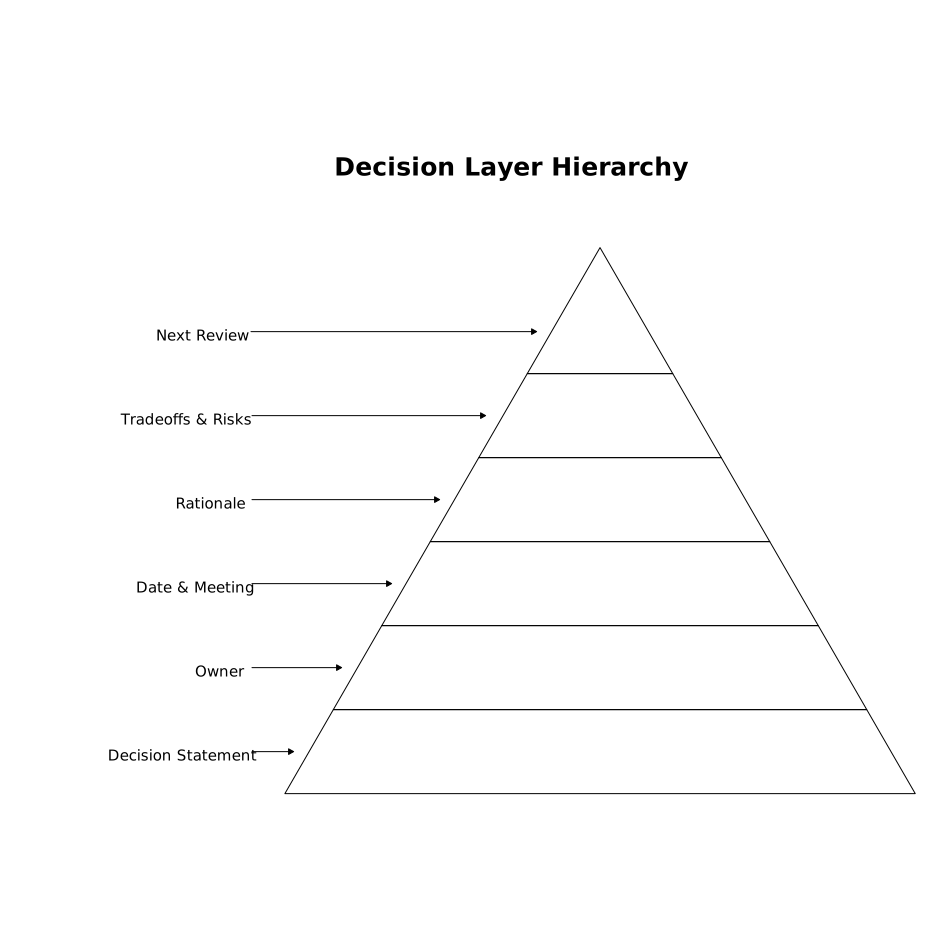
This layer should change rarely. If a decision is reversed, you don’t overwrite history; you create a new decision entry that supersedes the old one.
Layer 2: The Context Layer (refreshable, traceable)
This is everything that helps the decision make sense later: transcript excerpts, objections, alternatives considered, unresolved questions, links to tickets, and supporting data. This layer can evolve as more information appears—especially for multi-meeting decisions.
Critically, the context layer must remain traceable. If someone asks “Where did that come from?”, you should be able to point back to the transcript, the clip, or the specific message/thread where it was discussed.
Why Slack is a strong home for the Decision Layer
Slack already has the behaviors you want from a decision log: it’s where people look first, it’s searchable, it supports permalinks, and it preserves time-based context in channels and threads. The problem is that normal Slack messages are not structured and they drift out of view.
The Two-Layer approach uses Slack for what Slack does well—fast access and visibility—while keeping the deeper supporting material attached via links and threads so it’s there when needed, but not cluttering the log.
System design: from transcript to auto-updated decision log
The system has four moving parts: capture, extract, publish, and update.
1) Capture: record meetings reliably and ship the transcript fast
You need a recorder that produces consistent transcripts and a dependable post-meeting summary. Fathom is designed for this workflow: it records and transcribes calls, generates immediate summaries and action items, and supports searchable transcripts, highlights, and team visibility across meetings. That consistency matters because your downstream automation is only as good as the raw capture.
At capture time, add one lightweight habit: include a “decision keyword” in the meeting (e.g., “Decision:” spoken aloud) or a consistent agenda section (e.g., “Decisions and owners”). This gives the extractor something stable to latch onto.
2) Extract: generate structured decisions from the transcript
Extraction is where teams often overcomplicate things. You don’t need a perfect “AI decision detector.” You need a repeatable schema and a conservative rule: only publish decisions that are explicitly confirmed.
Use a decision object that can be stored and updated:
- Decision ID (unique, stable)
- Title (short)
- Status (Proposed / Confirmed / Superseded)
- Owner
- Decision text
- Rationale bullets
- Evidence links (transcript, clip, doc)
- Slack message permalink (where it lives)
As a safety mechanism, treat “Proposed” as non-loggable to the main channel. Proposed items can go to a thread or a staging channel for quick confirmation. Only “Confirmed” decisions enter the visible log.
3) Publish: post a clean decision card to Slack and attach context in a thread
For each confirmed decision, post a compact “decision card” message to a dedicated channel (e.g., #decision-log) or to the relevant project channel with a predictable prefix (e.g., [Decision]). Keep the message short enough that scanning works.
Then, immediately create a thread under that Slack message containing:
- Key transcript excerpts (short quotes or paraphrases)
- Links to the full transcript and any highlight clip
- Open questions
- Related tickets/docs
This is the “two-layer” effect in Slack: the top message is the stable decision record; the thread is refreshable context.
4) Update: edit the decision card when the decision changes, not when context changes
Auto-updating is where teams either lose trust (“the bot rewrote history”) or get real leverage. The rule is:
- Edit the top decision card only for status changes, owner changes, or superseding decisions.
- Add to the thread for new evidence, new constraints, and follow-ups.
When a later meeting reverses a decision, post a new decision card and include “Supersedes: [link]” plus update the older one to “Superseded” with a pointer forward. This keeps an auditable trail.
Automation blueprint without manual copy-paste
You can implement this with native integrations plus an automation layer (often Zapier/Make) and a small amount of structured storage (a table in Notion/Airtable, a database, or even a Google Sheet). The storage is optional but helpful for deduplication and edits.
- Trigger: meeting ends and transcript/summary is ready
- Step: extract decisions into structured objects
- Step: check if Decision ID already exists
- If new: post decision card to Slack + thread context
- If existing: update Slack message (status/owner) and append new context in thread
If your team already relies on turning notes into scheduled work, pair this with an agenda-to-actions ritual so decisions immediately produce time-blocked follow-through. A related approach is described in a 10-minute agenda-to-actions ritual.
Guardrails that keep the decision log trustworthy
Use “decision-ready language”
Train facilitators to confirm decisions explicitly: “We are deciding X, owner is Y, deadline is Z.” This reduces false positives and makes extraction more accurate.
Require an owner and a review trigger
Decisions without owners rot. Decisions without review triggers silently become outdated. Even a simple trigger (“revisit when churn exceeds 5%”) helps.
Normalize names and entities
Teams suffer when the same customer or feature has multiple labels. If you’re syncing meeting outputs into sales systems, align fields and naming so the decision log connects cleanly to CRM records. For a practical checklist mindset, see a field-level CRM sync checklist.
Keep sensitive content out of the Decision Layer
Slack channels often have broad membership. Put sensitive customer details in the context layer with access-controlled links, and keep the decision card high-level.
What this system changes week to week
Within a few weeks, teams typically notice three concrete shifts: fewer repeated debates (“we already decided this”), faster onboarding into ongoing projects (new teammates can scan the log), and cleaner accountability (owners and triggers are visible). The Two-Layer Notes system works because it respects how decisions actually evolve: the commitment stays stable, the context keeps accumulating, and Slack remains the place where people naturally look.
Frequently Asked Questions
How does Fathom fit into a two-layer notes workflow?
Fathom provides the capture layer: reliable recording, transcripts, and immediate post-meeting summaries. Those outputs can feed an automation that publishes a stable decision card to Slack and attaches the supporting transcript context in a thread.
What should be included in the Slack decision card versus the thread when using Fathom notes?
Put only the durable facts in the decision card (decision statement, owner, date, status, and a short rationale). Use the thread for refreshable context pulled from Fathom transcripts—key excerpts, links to highlights, open questions, and follow-ups.
How do you prevent an auto-updated Slack decision log from rewriting history with Fathom?
Use a strict update rule: edit the top Slack message only for status/owner changes or to mark it superseded. Add new evidence and discussion as thread replies with links back to the relevant Fathom transcript sections.
Can Fathom decision logs work across Zoom, Google Meet, and Microsoft Teams?
Yes. Fathom supports Zoom, Google Meet, and Microsoft Teams, so the same two-layer pipeline can standardize decision capture regardless of meeting platform.
What’s the simplest way to deduplicate decisions when generating them from Fathom transcripts?
Assign a stable Decision ID (for example, a hash of meeting ID + normalized decision title) and store it in a lightweight table. When a new Fathom summary arrives, check the ID before posting; if it exists, update the existing Slack message and append context in the thread.