Why TLS fingerprints matter during warmup
Most warmup advice focuses on DNS authentication (SPF, DKIM, DMARC), volume ramps, and engagement signals. Those are foundational. But during warmup, mailbox providers and filtering layers also observe “how” your email is transmitted, not just “what” it contains. One of the quieter variables is the TLS fingerprint created when your sending system negotiates encryption with the receiving server.
A TLS fingerprint is not a single field in a header. It’s an emergent profile produced by choices such as TLS version, cipher suites offered, extension ordering, SNI behavior, and how STARTTLS is negotiated on SMTP. When this profile changes abruptly—or looks inconsistent with the rest of your sending identity—it can add friction to trust building. The impact is rarely a hard block; it’s more often a subtle shift in inbox placement probabilities during the period when your reputation is still fragile.
STARTTLS is optional but heavily observed
SMTP typically begins in plaintext, then upgrades to encryption using STARTTLS if both parties support it. Many receiving servers prefer encrypted transport and will log whether the connection upgraded and what was negotiated. During warmup, you want your transport signals to be boring: predictable, modern, and aligned with normal sending infrastructure.
Two patterns create risk:
- Inconsistent STARTTLS behavior across the same domain or IP range (some sessions upgrade, others don’t, with no clear reason).
- Outlier TLS profiles (old TLS versions, odd cipher ordering, missing extensions) that look like a custom script, a misconfigured MTA, or an atypical relay chain.
Receivers don’t need to “penalize TLS” directly for it to matter. Transport metadata can become a supporting signal that influences how aggressively a filter trusts early engagement, how much content scrutiny is applied, or how quickly reputation is allowed to climb.
What “TLS fingerprint mismatch” looks like in practice
A mismatch usually shows up as a gap between your apparent sending setup and the transport profile you present. Common examples include:
- Switching providers mid-warmup (e.g., from a legacy SMTP relay to a cloud email API). Your DKIM might stay the same, but your TLS fingerprint changes overnight.
- Mixing MTAs for different streams (transactional vs. outbound sales) while using the same From domain. One stream negotiates TLS 1.3 with modern ciphers; the other offers older suites first.
- Regional or network egress differences where some traffic exits through a different stack (different OS, OpenSSL version, or load balancer), producing a distinct fingerprint.
- STARTTLS downgrade quirks caused by misordered commands, intermittent timeouts, or inconsistent certificate presentation on your side when acting as a relay.
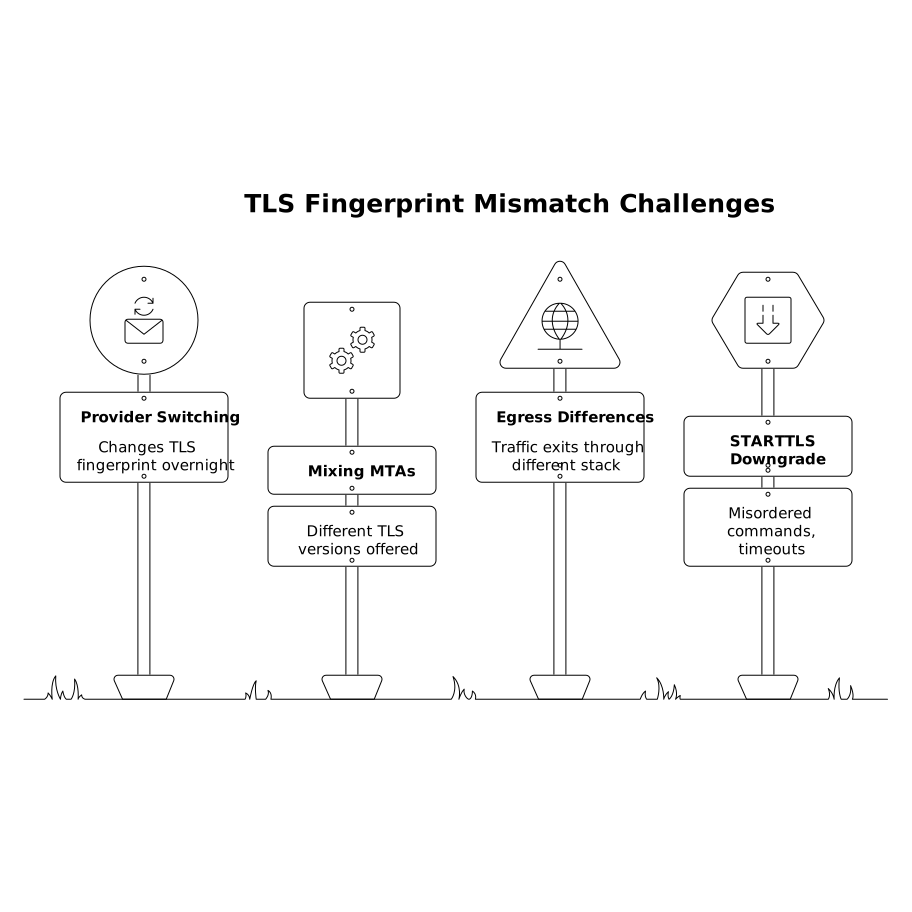
In isolation, any one of these can be harmless. During warmup, when filters are deciding whether you’re a stable sender or a newly assembled stack, inconsistencies can slow trust accumulation.
TLS versions and cipher choices that tend to trigger “oddity” signals
Older TLS versions
TLS 1.2 remains common on SMTP. TLS 1.3 is increasingly available, but adoption varies by server and MTA. The issue isn’t that TLS 1.2 is “bad”; it’s that offering only older versions (or frequently negotiating downgraded sessions) can look dated compared to modern bulk and API senders.
A warmup sender that negotiates TLS 1.0/1.1 (still seen on outdated stacks) is especially likely to stand out. Even if delivery still works, it’s an unnecessary anomaly.
Cipher suite ordering and “library fingerprints”
Receivers can often infer your underlying TLS library (or its configuration) from cipher suite lists and extension ordering. A typical managed provider stack will have a fairly standard profile. A bespoke implementation, an old Linux distribution, or a nonstandard proxy can create a fingerprint that doesn’t match the rest of your infrastructure story.
The operational takeaway: avoid homegrown TLS stacks for outbound email during warmup unless you have a strong reason and the ability to validate consistency across all egress paths.
Certificate and hostname consistency
SMTP STARTTLS uses certificates too. Certificate misalignment doesn’t always break delivery, but it can be logged and scored. Examples include mismatched hostnames, weak chains, or rotating certificates across different relays in ways that look chaotic. A stable certificate posture makes your transport layer feel like a well-run service, not a temporary bridge.
Why this affects inbox placement specifically during warmup
Warmup is reputation formation under uncertainty. Filters have limited history for a new domain, IP, or mailbox, so they lean more heavily on corroborating signals: authentication, complaint rate, bounce patterns, user engagement, sending consistency, and operational “sanity” of the transport.
A stable TLS fingerprint supports the broader story that you are:
- using consistent infrastructure,
- operating a maintained stack,
- and sending predictably.
When TLS characteristics churn while other elements (domain, DKIM, cadence) remain constant, it can create a “new sender again” effect at the edges, where placement decisions are probabilistic.
How to keep TLS signals stable while you ramp volume
1) Choose a primary egress path and stick to it
During the first few weeks of warmup, minimize infrastructure changes. Avoid switching SMTP relays, changing MTAs, or introducing a new outbound proxy. If you must change, do it deliberately: migrate one stream at a time and expect a short-term reputation recalibration.
2) Separate streams that must differ
If you have multiple mail types (sales outreach, product notifications, support replies), split by subdomain and/or IP where practical. That limits the blast radius of a TLS profile difference. It also aligns with the broader principle of isolating reputation by stream.
3) Validate STARTTLS and negotiated parameters
At minimum, test a representative set of recipient domains (Gmail, Microsoft, Yahoo, and a few business MX providers) and confirm that your sessions upgrade reliably. If you see inconsistent upgrades or unexpected downgrades, fix that before scaling volume.
4) Don’t “tune ciphers” unless you know why
It’s tempting to harden settings aggressively. But unusual cipher lists or nonstandard ordering can create a unique fingerprint. In warmup, standard is often safer than clever. Use well-supported defaults from reputable MTAs and libraries.
Where a warmup platform fits in
Warmup success still depends primarily on building positive behavioral signals—opens, replies, and healthy inbox interaction—while keeping your sending identity consistent. A platform like mailwarm focuses on the engagement side of warmup, generating realistic activity across major mailbox ecosystems while you gradually increase volume. The strategic value is that it reduces variance in early reputation-building, so smaller technical anomalies (including transport-level quirks) are less likely to dominate outcomes.
If you’re troubleshooting placement swings, treat it like a systems problem: engagement and content signals, authentication alignment, and transport consistency. Transport is rarely the only cause—but during warmup it can be the difference between “slowly improving” and “randomly volatile.” For a broader view of how testing methods can mislead placement decisions, see Seed Lists Are Dead for Inbox Placement Testing.
A practical checklist for diagnosing TLS fingerprint mismatch
- Confirm your sending path: identify every relay, proxy, or MTA involved for each stream.
- Compare TLS negotiation outcomes: look for differences by recipient domain, region, or time of day.
- Check for infrastructure churn: deployments, autoscaling images, OpenSSL/library upgrades, load balancer changes.
- Correlate with placement: see whether inbox dips coincide with TLS changes rather than content changes.
- Stabilize first, optimize second: lock the stack, then tune warmup pacing and messaging.
To keep the process manageable, it helps to document “what changed” whenever placement shifts. Borrow the same discipline used in incident response: tight change logs, clear owners, and fast rollback criteria. That mindset is similar to a support triage approach where decisions are time-boxed and repeatable, like in A Triage SLA Playbook for 24-Hour Issue Decisions Without Draining Engineering Time.
Frequently Asked Questions
How can Mailwarm help if my TLS fingerprint changes during warmup?
Mailwarm can help stabilize reputation-building by generating consistent positive engagement signals while you fix infrastructure churn. It won’t replace TLS configuration work, but it can reduce the impact of short-term volatility during the ramp.
Should I disable STARTTLS to avoid TLS fingerprint issues when using Mailwarm?
No. Disabling STARTTLS usually creates a bigger trust problem than a minor fingerprint mismatch. Keep STARTTLS enabled, use a maintained MTA configuration, and let Mailwarm focus on engagement signals as you keep transport consistent.
What TLS versions are safest for outbound email warmup alongside Mailwarm?
In most environments, TLS 1.2 is a common baseline for SMTP and TLS 1.3 is fine where supported. The key is consistency across your traffic rather than chasing the newest setting. Keep legacy versions disabled unless you have a strong compatibility need.
Why would inbox placement change if SPF/DKIM/DMARC are correct and I’m using Mailwarm?
Authentication is necessary but not sufficient. Placement can shift due to transport consistency (TLS/STARTTLS behavior), complaint rates, bounce patterns, content changes, and sending cadence. Mailwarm addresses engagement signals, but you still need a stable sending stack and clean list practices.
How do I tell if I have multiple TLS fingerprints in one sending program with Mailwarm?
Map your outbound routes (transactional, outreach, support) and check whether different relays or MTAs are involved. If placement varies by stream or by recipient domain, that’s often a hint. Standardizing on one egress path during warmup usually reduces fingerprint variation.