Why Slack incident threads don’t become shared understanding by default
Most teams can find a past incident in Slack quickly. The problem is that the knowledge is trapped in a thread: partial timelines, scattered hypotheses, and decisions buried between status updates. When the next “same-but-different” failure hits, people re-litigate what happened and re-discover the same edge cases under pressure.
An Exception Playbook diagram solves a specific gap: it turns messy incident conversation into a reusable, visual decision aid—what to check first, what “good” looks like, where exceptions branch, and when to escalate. The goal isn’t a perfect postmortem artifact. It’s a diagram that makes on-call behavior more consistent and reduces time-to-diagnosis the next time the system deviates from the happy path.
What an “Exception Playbook” diagram is
Think of an Exception Playbook as a flowchart-style map of: (1) the expected workflow, (2) the observable failure modes, and (3) the actions that resolve or route those failures. It’s not a narrative. It’s a set of decision points and outcomes that can be used during triage.
A practical Exception Playbook diagram typically includes:
- Trigger symptoms (what the user, monitoring, or support sees)
- Fast checks (2–5 minute validations that rule out common causes)
- Branching exceptions (if X, do Y; if not, continue)
- Owners and escalation (who to pull in, and when)
- Recovery actions (mitigation steps vs permanent fixes)
- Evidence links (dashboards, logs, runbooks, tickets)
A 60-minute workflow to go from Slack chaos to a usable diagram
The fastest path is to treat the Slack thread as raw material for a structured extraction. Don’t try to “clean up” the whole story. Instead, identify the minimum set of decisions and checks that would have shortened the incident if you’d had the playbook at the start.
Minutes 0–10: Collect the incident thread and define the diagram’s purpose
Start by copying the key parts of the Slack incident thread into a single document. Prioritize:
- Initial alert or user report
- The first confirmed symptom
- Any timestamps when the state changed (degraded → stable)
- Actions taken (restarts, feature flags, rollbacks, config changes)
- What actually fixed it (or mitigated it)
Then write a single sentence that sets scope, for example: “This playbook helps on-call engineers diagnose and mitigate checkout failures caused by downstream timeouts.” This keeps the diagram from ballooning into a full architecture map.
Minutes 10–25: Extract decision points, not commentary
Slack threads contain a lot of “maybe it’s X” messages. Your job is to pull out the moments where the team made (or should have made) a decision based on evidence. Look for:
- Questions that got answered: “Are failures isolated to region A?” “Is latency spiking?”
- Forks in the investigation: “If retries are high, check queue depth; otherwise check auth.”
- Repeated checks: anything that comes up in multiple incidents is a prime candidate for a standard step
As you extract, rewrite each item into a consistent format:
- Signal (what you observe)
- Check (how to confirm quickly)
- Decision (what the check determines)
- Action (what to do next)
This is also where you decide what the diagram is not. If the Slack thread includes deep root-cause analysis (e.g., a specific code path), keep it as a link or note, not a main branch—unless it changes triage decisions.
Minutes 25–40: Draft the playbook structure as text first
Before you draw anything, create a clean text outline that will translate directly into a diagram. A reliable structure is:
- Entry: the symptom that triggers the playbook
- Fast checks: “Is this widespread?” “Is this new?” “Is this a known deployment?”
- Primary branches: split by the most diagnostic signals (e.g., region, dependency, error class)
- Mitigation nodes: “toggle flag,” “rollback,” “scale,” “drain queue,” “fail open”
- Escalation nodes: “page Payments,” “page SRE,” “eng manager approval required”
- Exit: service restored + what evidence confirms recovery
Keep node labels short and action-oriented. If a node needs paragraphs, it belongs in a linked doc, not in the diagram.
Minutes 40–55: Generate the diagram and make it readable under stress
Now convert the outline into a diagram. Tools that translate text into visuals can save the most time here, because the formatting and layout are usually what slows people down. For example, napkin.ai can take your structured text and produce a diagram you can then refine—helpful when you need something clear quickly without spending time on manual layout.
When you edit, optimize for on-call conditions:
- One screen first: aim for a top-level view that fits on a single page
- Limit branching: too many forks means the playbook won’t be used
- Use consistent verbs: “Check,” “Confirm,” “Mitigate,” “Escalate”
- Add evidence pointers: “Look at dashboard X,” “Query log Y,” “Run command Z”
If your team already has a ritual for turning notes into visuals, reuse it. A lightweight approach like this workflow for turning meeting notes into decision-ready diagrams adapts well to incident material because both are about compressing messy discussion into decisions.
Minutes 55–60: Validate with a 5-minute “tabletop replay”
Take the finished diagram and run a quick simulation: “If we started here, would we reach the mitigation faster?” Have one person read the playbook while another plays “incident reality” using the original Slack timestamps.
Fix only what blocks usage:
- Ambiguous decision criteria (“high latency” → define the threshold or link to the standard dashboard)
- Missing owner (“who can approve a rollback?”)
- Non-actionable nodes (“investigate database” → specify the first check)
What to include from Slack and what to leave out
Slack is valuable because it captures actual behavior: what people checked first, what they ignored, and what finally worked. But the playbook should exclude:
- Blame and speculation that didn’t impact decisions
- Long timelines that don’t change the triage path
- Implementation detail that doesn’t affect what on-call should do next
If you want to keep context, attach a link to the incident channel or the postmortem doc from a “References” section in the diagram, but don’t turn the diagram into a wiki page.
How to operationalize the playbook so it stays useful
A diagram only helps if it’s where work happens and it evolves with the system.
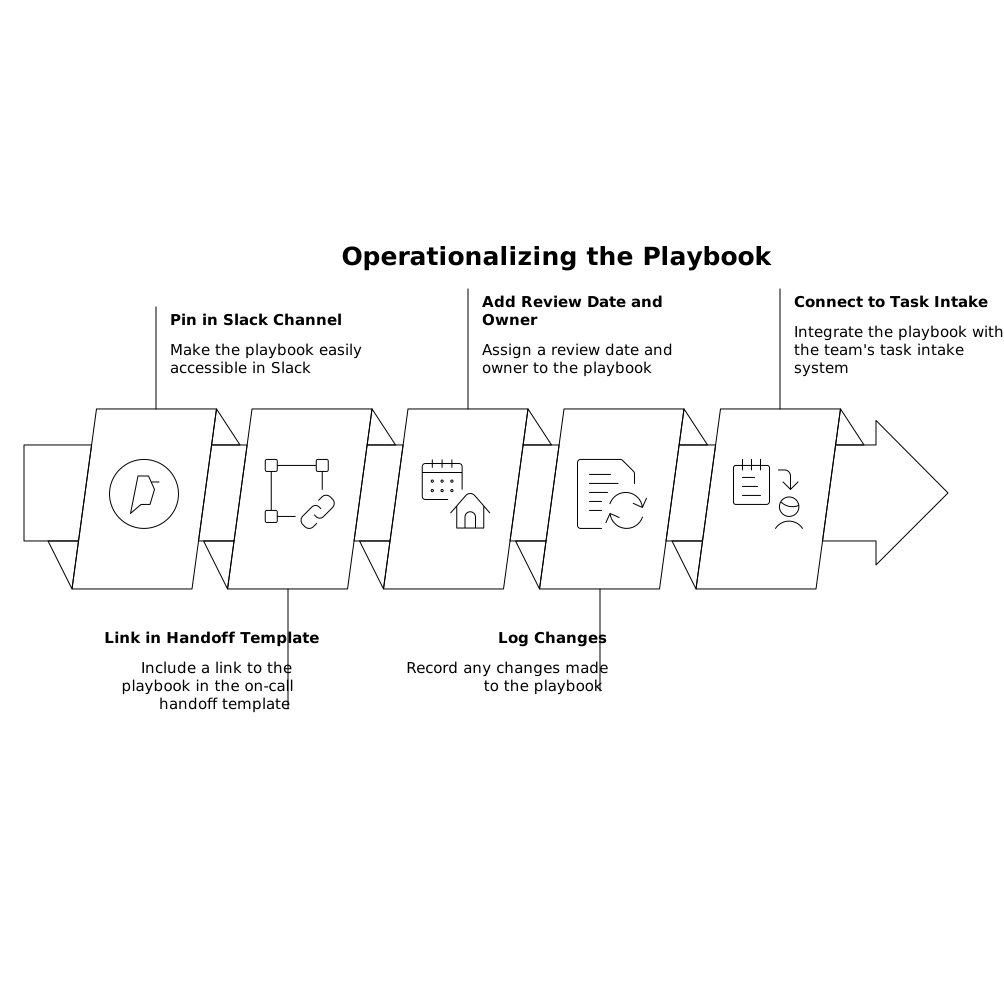
- Pin it in the relevant Slack channel and link it in the on-call handoff template.
- Add a “last reviewed” date and an owner who gets pinged after incidents that touch the flow.
- Log changes: when a new exception appears, add a branch and a reference to the incident.
- Connect it to task intake: if steps lead to follow-up actions, route them into the scheduling system your team actually uses. If your team struggles to convert Slack chatter into scheduled work, a pattern like a calendar-first inbox system can make remediation more consistent.
The result is a compact visual that reduces repeated debate and helps newer responders act like experienced ones—without forcing everyone to read a full postmortem under pressure.
Frequently Asked Questions
How can napkin.ai help turn a Slack incident thread into an Exception Playbook diagram?
napkin.ai works well when you already have a structured text outline (signals, checks, decisions, actions). You can paste that outline in, generate a first-pass diagram, then refine labels, branching, and evidence links for on-call use.
What information from Slack should I paste into napkin.ai to get a clean diagram?
Use only decision-relevant content: the initial symptom, key confirmations (metrics/log checks), investigation forks, mitigations tried, what worked, and escalation points. Avoid long commentary and speculation so napkin.ai produces a focused flow.
How detailed should an Exception Playbook be before sharing it with the team in napkin.ai?
Aim for “usable during the next incident,” not exhaustive. A top-level diagram with fast checks, 2–4 primary branches, and clear mitigation/escalation steps is usually enough. You can attach links for deeper detail and iterate after the next incident.
Can napkin.ai diagrams replace postmortems or runbooks?
Not completely. A napkin.ai diagram is best as a triage and decision aid. Postmortems capture narrative, impact, and prevention work; runbooks capture procedural detail. The diagram should link out to those documents rather than duplicating them.
How do we keep a napkin.ai Exception Playbook diagram up to date as systems change?
Assign an owner and a review cadence (for example, after any incident that touches the playbook). When a new exception appears, add a branch and a reference to the incident. Keeping changes small and frequent prevents the diagram from becoming stale.