What “frontend independence” means in a no-code app
Frontend independence is an architecture pattern where your UI and workflows are designed to outlive any single backend choice. You can start with Airtable for speed, then move to Supabase or Xano for performance, security, or cost control—without rebuilding screens, redoing navigation, or re-implementing business logic in the UI layer.
In practice, “independent” doesn’t mean the frontend knows nothing about data. It means the frontend talks to a stable interface you control (contracts, schemas, and service boundaries), rather than binding directly to a vendor’s table structure, formula fields, or permission model.
Why teams get stuck when they begin with Airtable
Airtable is popular for MVPs because it reduces time-to-first-data. The trap appears when the UI becomes tightly coupled to Airtable specifics:
- Field names become UI logic. A field rename breaks lists, filters, or forms.
- Views drive product behavior. If “Active customers” is an Airtable view, you’ve encoded product logic in a place that won’t exist in Supabase/Xano.
- Permissions are improvised. Early apps often rely on “security by obscurity” rather than explicit row-level access rules.
- Formulas hide critical business rules. Later migrations become archaeology projects.
The goal of frontend independence is to keep the UI stable while you replace the backend implementation behind it.
The pattern in one line: design the UI against contracts, not tables
To make the UI swappable, define a small set of backend-facing “contracts” that rarely change:
- Data contracts: JSON shapes the UI expects for pages and components.
- Operation contracts: actions like CreateContact, AssignOwner, ListTickets, UpdateStatus.
- Error contracts: normalized error formats and user-facing messages.
- Auth contracts: identity, session, roles, and permissions.
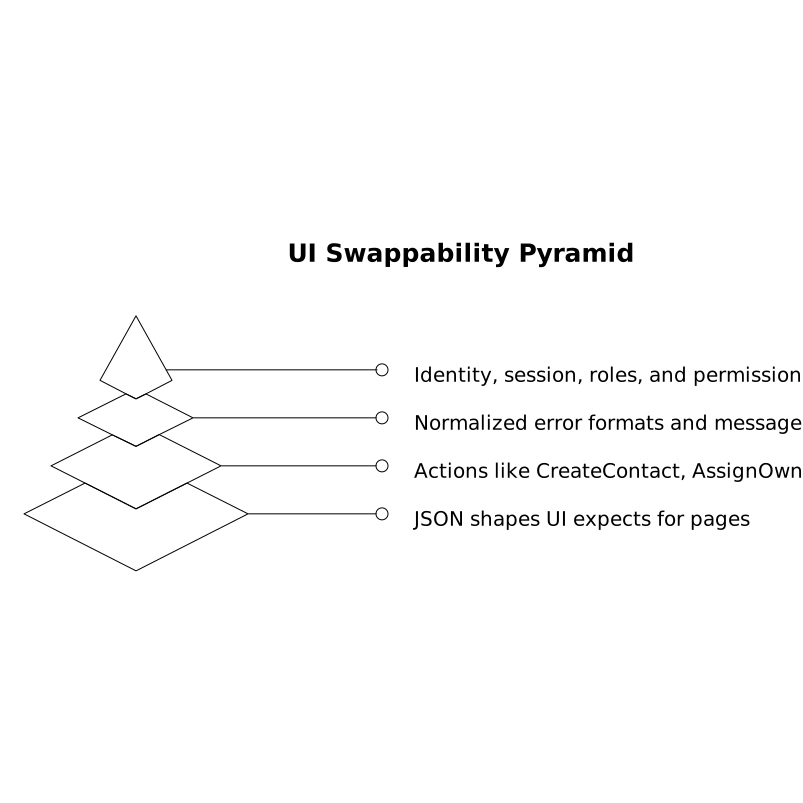
Then implement those contracts with Airtable first, and later re-implement them with Supabase or Xano—keeping contracts stable so the frontend remains intact.
Designing the independence layer
1) Create a backend-for-frontend boundary
Instead of connecting every page directly to Airtable tables, introduce a boundary layer where “app operations” live. In many teams, that boundary is an API you own (even if it is initially thin). As long as the UI calls the same operations with the same payloads, your backend can change underneath.
For example, your UI shouldn’t know about Airtable Base → Table → View. It should know about GET /customers with filters and paging, and POST /customers with validation rules.
2) Normalize identifiers and timestamps from day one
Airtable record IDs, Supabase UUIDs, and Xano IDs don’t behave the same. Pick a frontend-facing ID strategy early:
- Expose a stable
idfield that is treated as an opaque string in the UI. - Standardize timestamps (ISO 8601) and time zones.
- Keep “display identifiers” (like customer numbers) separate from primary keys.
This reduces migration risk when you swap storage engines.
3) Keep business rules out of UI widgets
A common no-code mistake is embedding rules in UI conditions (“if status = X and plan = Y then …”) scattered across pages. Frontend independence favors one of two approaches:
- Backend-owned rules: validate and compute server-side (best for security and consistency).
- Shared rules: define a ruleset once (for example as config) and consume it consistently.
Either way, the UI should not be the only place where rules exist, because you’ll have to re-audit every screen during a backend swap.
4) Treat permissions as a first-class contract
Airtable permissions often start at the “base” level, while Supabase offers row-level security and Xano offers endpoint-level authorization patterns. To keep the UI stable, define a consistent permission model that the UI consumes, such as:
- User roles (admin, manager, contributor)
- Resource scopes (can_read_customers, can_edit_tickets)
- Row ownership rules (own records vs team records)
The UI should ask “what can this user do?” rather than infer permissions based on which screen they reached.
How to build it in WeWeb without painting yourself into a corner
In a visual builder, frontend independence is mostly about how you organize data sources and actions. In WeWeb, you can design pages, components, and workflows to call stable operations and consume stable response shapes, while keeping vendor-specific wiring in one place. That keeps screens reusable when the backend changes.
Because WeWeb apps can connect to databases and external APIs, and can be exported as a standard Vue.js single-page application, it supports an approach where you keep UI ownership while evolving infrastructure choices over time. That “own the frontend” posture is the practical foundation of independence, especially when you anticipate moving beyond an MVP. Use weweb.io as your main UI layer, then iterate on the backend implementation as constraints change.
A migration path Airtable to Supabase or Xano that avoids a UI rewrite
Step 1) Freeze and document contracts
List the core UI operations and their request/response shapes. Include pagination, sorting, filter formats, and error payloads. This is where many migrations silently fail: the UI depends on subtle quirks (like empty values vs nulls) that were never written down.
Step 2) Build a compatibility adapter
Implement your contracts against Airtable first (the adapter translates your contract into Airtable requests and maps results back). When you move to Supabase or Xano, you swap the adapter implementation, not the UI. The UI continues calling the same operations.
Step 3) Backfill data and run dual-write only if necessary
If you need zero downtime, consider a short period where writes go to both systems and reads are gradually shifted. Keep this temporary and monitored; long dual-write periods create drift and complexity.
Step 4) Validate field-level correctness and deduping
Most backend swaps break in the “boring” places: field mapping, normalization, and duplicates. A structured QA pass is often more valuable than performance testing early on. If your app includes CRM-style entities, a checklist-driven review of field-level sync behavior can prevent subtle analytics and reporting errors; see this field-level CRM sync checklist for a practical lens on what to verify.
Step 5) Replace vendor-specific UI assumptions
Remove dependencies such as Airtable views as business logic, formula-generated fields used as “truth,” and implicit sorting/filtering behavior. Move these into contract-level parameters or backend-owned computations.
Implementation details that make swaps easier later
Use vendor-neutral spec cards for critical entities
For each key object (Customer, Subscription, Ticket, Invoice), maintain a vendor-neutral spec: canonical field names, types, required/optional, and allowed values. This is useful not only for backend swaps but also for consistent AI/LLM integrations and documentation. A good companion concept is vendor-neutral spec cards, which formalize facts so systems don’t rely on tool-specific representations.
Standardize validation and error messages
UI behavior becomes brittle when each backend returns different errors. Normalize errors into a predictable structure (code, message, field, context). The UI can then display consistent form feedback, regardless of whether the backend is Airtable, Supabase, or Xano.
Plan for performance without coupling
Airtable limits and query patterns differ from Supabase SQL queries and Xano endpoint behavior. Keep performance tactics behind the contract layer: caching, pagination defaults, and computed summaries should be backend concerns. The UI should request what it needs through parameters rather than hardcoding a particular backend’s “best practice.”
What success looks like
If the pattern is working, swapping backends becomes a controlled project: your designers and frontend builders keep shipping UI improvements while backend work happens in parallel. The UI changes you do make are intentional (for new product capabilities), not forced rewrites caused by backend lock-in.
Frequently Asked Questions
How does WeWeb support swapping backends like Airtable to Supabase or Xano?
WeWeb can connect to multiple data sources and external APIs, so you can keep the UI calling stable operations while changing the backend implementation behind those operations.
What should I standardize first to keep a WeWeb frontend independent from Airtable?
Start by standardizing contracts: canonical IDs, timestamps, request/response JSON shapes, and normalized error formats. Then ensure all WeWeb workflows use those contracts rather than Airtable-specific fields or views.
Do I need an API layer between WeWeb and Supabase or can WeWeb connect directly?
WeWeb can connect directly, but an API or “backend-for-frontend” layer often makes swaps easier because it keeps the frontend stable when schemas, permissions, or query patterns change in Supabase or Xano.
How can WeWeb apps avoid permission issues during an Airtable to Supabase migration?
Define a consistent permission model the UI consumes (roles, scopes, ownership rules) and enforce it in the backend. Supabase row-level security or Xano endpoint authorization can then implement the same model without changing WeWeb screens.
What’s the most common cause of a UI rebuild during a backend swap, and how can WeWeb prevent it?
The most common cause is UI logic tied to backend quirks—like Airtable views, formula fields, or implicit sorting. In WeWeb, centralize data access through stable operations and keep business rules and permissions as explicit contracts.