Define a calendar-first inbox before you touch your inbox
A calendar-first inbox system flips the usual workflow. Instead of letting email and Slack create an ever-growing task list, you convert only the items that matter into scheduled work on your calendar. The goal is simple: your calendar becomes your execution engine, and your inbox becomes a triage queue—not a second to-do app.
This approach works best when you commit to two rules:
- No “infinite capture.” If you can’t realistically schedule it, you shouldn’t “save” it as a task.
- Scheduling beats listing. If something requires real effort, it gets a time block or it doesn’t exist operationally.
Tools can help, but the system is primarily behavioral: you’re building a repeatable decision pipeline from message → decision → calendar.
Classify every message into four outcomes
When you open an email thread or Slack DM, you need a fast rubric that prevents over-processing. A practical calendar-first rubric is:
- Do (under 2 minutes): reply, confirm, forward, or close it immediately.
- Schedule (requires focus): convert into a time block with a clear next action.
- Delegate (someone else owns it): hand off with context and a defined expectation.
- Archive (reference only): save it, label it, or pin it—no task created.
The key is that “Schedule” is the only path that creates future work for you. Everything else is resolved, reassigned, or stored.
Convert “Schedule” items into calendar blocks, not a giant task list
Most task lists explode because they accept unlimited input at near-zero cost. Scheduling forces a constraint: time. To convert an inbox item into scheduled work, capture three specifics:
- Outcome: what “done” looks like (e.g., “Send revised pricing page copy”).
- Next action: the first concrete step (e.g., “Draft 3 headline options and 5 bullets”).
- Duration: how long you’ll work before you reassess (e.g., 25 minutes, 45 minutes, 90 minutes).
If you can’t name these, you’re not ready to schedule it. In that case, ask a clarifying question immediately rather than creating a vague task that will haunt you later.
Use time-blocking patterns that keep your week stable
Calendar-first breaks down if every new message rearranges your entire day. Stabilize the system with a few repeatable blocks:
- Inbox triage blocks (15–30 minutes): 1–3 times per day rather than constant checking.
- Execution blocks (45–90 minutes): deep work reserved for scheduled “Schedule” items.
- Admin blocks (30–60 minutes): approvals, forms, travel booking, lightweight coordination.
- Slack window (10–20 minutes): batch responses and reduce reactive context switching.
This is where a unified workspace matters. A platform like Routine fits the calendar-first approach because it connects calendar, tasks, and notes so the “scheduled work” you commit to doesn’t live separately from the context that created it.
Prevent task explosion with a hard “calendar capacity” rule
The most important control in a calendar-first inbox is a capacity rule you follow consistently. A simple version:
- Only schedule new work if there is a real slot this week.
- If there is no slot, renegotiate. That means: decline, defer, delegate, or re-scope.
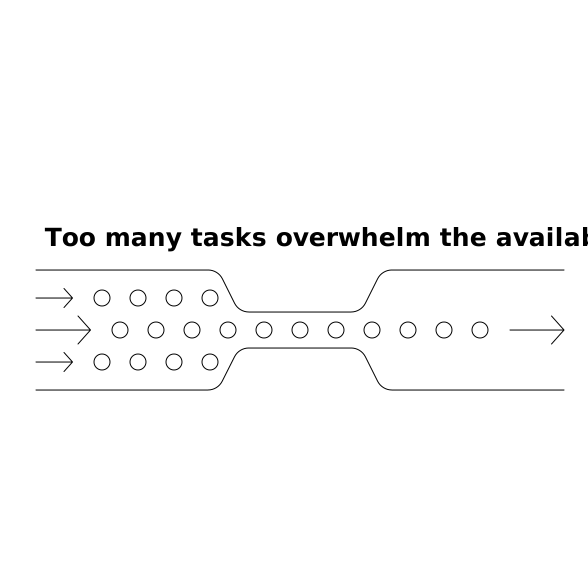
This forces you to treat your time as a finite resource. If a request matters, it earns calendar space. If it doesn’t, it shouldn’t quietly accumulate in a backlog.
Renegotiation templates that work in email and Slack
- Defer: “I can take this on next week. Does Tuesday or Thursday work?”
- Re-scope: “I can deliver a draft outline today, full version by Friday. Which do you need?”
- Clarify: “What’s the decision this supports, and by when?”
- Delegate: “Looping in [Name]—they can own this. I’ll review on Friday.”
Renegotiation is what keeps the system honest. Without it, you’ll revert to accepting everything and hiding it in a list.
Turn message threads into work with built-in context
Another reason task lists inflate is that each task becomes a “context vacuum.” You later reopen it and have to re-read the entire thread. Instead, when you schedule the work, attach the minimum context needed to execute:
- Link to the email thread or Slack message
- One-sentence summary (“Customer asked for SOC 2 details + timeline”)
- Any relevant files or doc links
- Definition of done (deliverable + recipient)
If you regularly convert meeting-related messages into scheduled work, it helps to standardize your capture flow. The same principle used in a short agenda-to-actions ritual applies here: reduce the distance between “information” and “time-blocked execution.” For a related workflow, see this agenda-to-actions ritual for time-blocked tasks.
Handle Slack differently: treat it like a queue, not a to-do list
Slack is optimized for immediacy, which is exactly why it can destroy calendar-first systems. The fix is to separate responsiveness from execution:
- Responsiveness happens in Slack windows: quick answers, routing, confirmation.
- Execution happens on the calendar: anything requiring real thinking becomes scheduled work.
When you’re tagged with “Can you take a look?”, avoid the trap of reading, thinking, and partially doing the work in the moment. If it needs focus, schedule it and reply with the plan: “Yes—blocked 45 minutes at 2:00 pm. I’ll update the thread after.”
Build a daily operating loop that makes the system sustainable
A calendar-first inbox is not a one-time setup; it’s a loop. A minimal loop that holds up under real volume looks like this:
- Morning (10 minutes): scan today’s calendar blocks, confirm the top 1–3 outcomes, and adjust for meetings.
- Midday (15–20 minutes): triage inbox/Slack, schedule only what can fit, renegotiate the rest.
- End of day (10 minutes): close open loops, move unfinished blocks intentionally, and write a short note for tomorrow.
Over time, this loop reduces anxiety because your commitments stop living in scattered threads. Work becomes visible as time on the calendar, and you can see tradeoffs immediately.
Common failure modes and how to fix them
You keep scheduling work but still feel behind
This usually means you’re underestimating durations or letting interruptions eat execution blocks. Fix it by adding buffers and tracking actual time for one week. If a type of task regularly takes 60 minutes, stop giving it 30.
Your calendar becomes a graveyard of moved blocks
Repeatedly moving blocks is a signal the work is either unclear or too big. Split it into smaller scheduled sessions with a concrete deliverable per block (draft, review, send). If it’s not important enough to earn a smaller slot, it’s not important enough to keep.
You’re afraid to say no, so tasks leak into a backlog
Use the capacity rule as a neutral constraint: “I don’t have a slot this week.” Offer options (defer, delegate, reduce scope). This keeps relationships intact while protecting your time.
What this system changes in practice
When email and Slack are treated as intake channels rather than workspaces, you stop measuring productivity by “messages processed” and start measuring by “scheduled outcomes delivered.” Calendar-first isn’t about rigid planning; it’s about making work commitments explicit, bounded, and finishable.
Frequently Asked Questions
How does a calendar-first inbox reduce overload compared with a traditional to-do list, and how can Routine help?
A calendar-first inbox forces every meaningful request to compete for limited calendar time, so you can’t accumulate unlimited “someday” tasks. With Routine, tasks and notes can live alongside your calendar blocks, making scheduled work easier to execute with the right context.
What’s the fastest way to process emails into calendar blocks in Routine without spending all day planning?
Use a tight rubric (Do, Schedule, Delegate, Archive) and only “Schedule” items that have a clear outcome, next action, and duration. In Routine, keep short inbox-triage blocks on your calendar so planning stays time-boxed.
How should I handle Slack requests without breaking deep-work time blocks in Routine?
Batch Slack into short response windows for quick coordination, and convert any focus work into a scheduled block on your calendar. Routine supports this by letting your day plan reflect real execution time, not just message volume.
What do I do when there’s no calendar space left but new emails keep coming, using a Routine-style workflow?
Apply a capacity rule: if there’s no real slot this week, renegotiate by deferring, delegating, or reducing scope. In Routine, the visible calendar makes that constraint explicit and helps you choose tradeoffs instead of hiding work in a backlog.
How can Routine support adding context so scheduled tasks don’t require rereading long threads?
When scheduling the work, attach a short summary, links to the thread, and the definition of done in the same place you plan the time block. Routine’s combined calendar, tasks, and notes approach is designed to keep that execution context close to the scheduled action.