Why role-based visibility matters for feature requests
A public feedback portal is valuable because it creates a shared source of truth. The problem starts when that same portal becomes a de facto roadmap: every request is visible, every status looks like a promise, and every internal note risks being interpreted as commitment.
A “Feedback Privilege Map” is a simple design concept: define what each role can see, do, and export at every stage of a feature request lifecycle. Done well, it protects product teams from maintaining two parallel backlogs (a visible one for customers and a hidden one for engineering) while still giving stakeholders meaningful transparency.
The goal is not secrecy. It’s intentional visibility that matches decision-making authority, reduces misalignment, and prevents “shadow backlogs” from forming in spreadsheets, Slack threads, and CRM notes.
The hidden cost of “everything is visible”
Most teams start with good intentions: let customers vote, let sales reference popular requests, let support link to ideas. Over time, a few predictable failure modes show up:
- Status inflation: “Under review” becomes a parking lot because moving to “Planned” feels like a contract.
- Internal debate leaks externally: feasibility notes, pricing implications, or security constraints are misunderstood by customers.
- Duplicate systems appear: product keeps a private Jira/Linear backlog, while the public portal becomes a second backlog with different phrasing, priority, and timestamps.
- Stakeholders over-index on vote counts: ignoring revenue impact, segment fit, and strategic alignment.
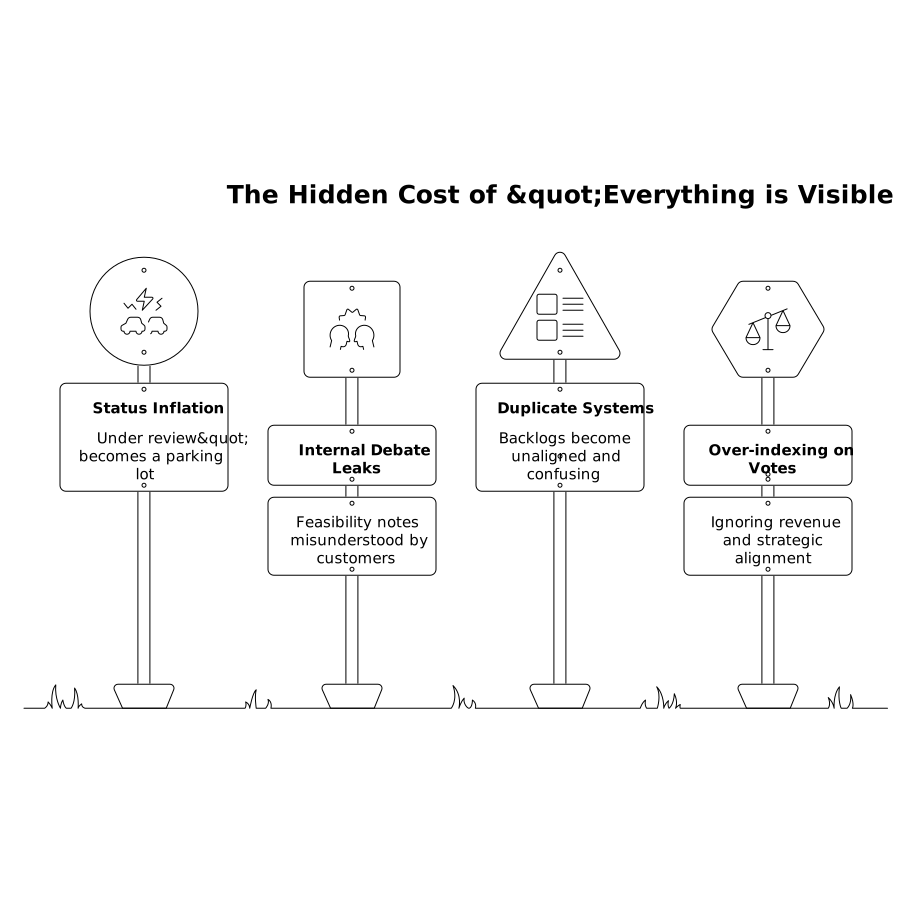
A privilege map counters these issues by making the portal an input and communication layer, not an alternate planning system.
Define your objects before you define permissions
Privilege design is easier when you separate the types of information that live inside a request. A practical model is to treat each feature request as a bundle of fields with different sensitivity levels:
- Public fields: title, problem statement, high-level status, tags, and sanitized updates.
- Customer-visible context: use cases, expected outcomes, and constraints that are safe to share.
- Internal fields: effort sizing, architecture notes, pricing/packaging impact, security review notes, and internal owner discussions.
- Commercial fields: linked accounts, ARR impact, renewal risk, sales stage, and “who asked” details.
Once you can point to concrete field groups, you can grant visibility without splitting the system into “public backlog” and “real backlog.”
Build the Feedback Privilege Map by role
A privilege map doesn’t need to be complicated. Start with a table in a doc: roles on one axis, key capabilities on the other (view, comment, vote, merge, change status, add internal notes, export). Then codify it in your tooling.
Customers and external users
Default to: they can submit, vote, and comment—plus receive updates. Keep external visibility focused on the problem and progress signals, not the mechanics of prioritization. If you share statuses, prefer a small set with clear meaning (for example: “Open,” “Considering,” “Planned,” “In progress,” “Shipped”).
What customers generally should not see: internal effort estimates, debate threads, and commercial leverage signals (like “high ARR account requested”). Those create the perception that priority is for sale, even when it’s not.
Support and success teams
Support needs enough access to link conversations to the right request and to keep responses consistent. A strong default is: view everything except the most sensitive internal fields, add private notes, and associate feedback with accounts or tickets.
If you’re using an SLA-based approach to decisions, privilege boundaries become even more important. Support can collect and enrich the request without needing authority to mark it “Planned.” This keeps status changes tied to decision owners. (Related operational patterns are covered in this triage SLA playbook.)
Sales teams
Sales typically needs: search, view demand, follow updates, and attach accounts/opportunities. The key is preventing “pipeline pressure” from turning into unilateral status changes or side-channel promises.
Sales should be able to answer, “Is this being considered?” and “How many customers want this?” without being able to rewrite the request into a deal-specific specification. Where possible, preserve a clear separation between the customer problem and a bespoke implementation path.
When sales data is synced into feedback tooling, field-level consistency matters (account IDs, plan tiers, segment labels). Otherwise the portal becomes a reporting headache. (If this is a recurring pain, use a field-level CRM sync checklist as a reference.)
Product managers and researchers
PMs need full control: merging duplicates, editing taxonomy, adjusting statuses, creating internal-only views, and publishing updates. The privilege map should also cover how PMs write internal notes so they’re structured and reusable (for example: “JTBD,” “Non-goals,” “Risks,” “Open questions”).
A subtle but important rule: treat status as a communication contract. If a PM can set “Planned,” they also own the follow-up messaging cadence and the definition of what “planned” means.
Engineering and technical leads
Engineering needs frictionless access to context without being forced into customer-facing communication. A common pattern is: engineers can view internal notes and add technical commentary, but only designated owners can publish externally.
This reduces the chance that a preliminary feasibility comment becomes interpreted as commitment. It also keeps engineering effort focused on decision-quality input: constraints, dependencies, and alternative approaches.
Executives and finance
Leadership often needs aggregated visibility more than thread-level control: dashboards by segment, revenue influence, and strategic themes. Grant access to analytics and internal views, but avoid making execs the de facto status setters unless your org explicitly runs that way.
Preventing shadow backlogs with lifecycle rules
Permissions alone don’t stop shadow backlogs. You also need lifecycle rules that make it easy to keep one canonical record.
- One request, many audiences: use public updates for broad messaging and internal notes for decision logs.
- Duplicate control: only a small set of roles can merge, and merges should preserve attribution (who asked, why it matters).
- Decision gates: define what evidence is required before a request can move from “Considering” to “Planned” (e.g., customer segments impacted, revenue exposure, security review, rough effort band).
- Export boundaries: limit who can export raw requester lists. This is often where privacy issues and “DIY prioritization” begin.
How tools like Canny fit into a privilege map
Privilege maps work best when your feedback system supports both public and private workflows in a single workspace. Platforms like canny.io are designed around centralizing requests, deduplicating input, and keeping users informed without forcing product teams to mirror their internal backlog publicly.
In practice, that means you can capture feedback from multiple sources, manage visibility with private roadmaps and controlled updates, and reduce manual effort with automation. The outcome you’re aiming for is straightforward: one reliable record per idea, with role-based access that matches how decisions are actually made.
Frequently Asked Questions
How does canny.io help prevent a shadow backlog from forming?
canny.io keeps feedback centralized so teams don’t need a separate spreadsheet or “public backlog.” With controlled statuses, deduplication, and audience-appropriate updates, one request can serve both internal decision-making and external communication.
What should customers be allowed to see in a canny.io feedback portal?
In canny.io, customers typically should see the request title, a clear problem statement, comments, votes, and high-level status updates. Keep internal effort estimates, commercial notes, and technical debate in internal-only fields or private views.
Can sales teams use canny.io without turning requests into promises?
Yes. Give sales read access to demand, the ability to attach accounts, and a consistent way to share official status from canny.io. Restrict who can change statuses like “Planned” so customer-facing commitments stay with product owners.
What permissions should engineers have in canny.io?
Engineers should be able to view full context and add technical notes in canny.io, but publishing externally should be limited to designated owners. This preserves fast feasibility input without accidental public commitments.
How do you decide who can export requester lists from canny.io?
Limit exports in canny.io to roles that genuinely need them (often product ops or admins). Export permissions are a common source of privacy risk and off-platform prioritization, which undermines the single source of truth.