Why “AI-friendly” markup can backfire
Structured data is meant to make pages easier to understand for crawlers and rich results. In AI-driven discovery, it can also influence how large language models (LLMs) extract and summarize facts. The trap is that teams often respond to “optimize for AI” by adding more markup everywhere: multiple JSON-LD blocks, redundant microdata, and nested objects that don’t match the visible page. That over-markup creates ambiguity. When LLMs (or the systems feeding them) encounter conflicting or noisy structured data, they can confidently return the wrong answer—or skip your page entirely in favor of a cleaner source.
The goal isn’t maximum schema. It’s consistent, field-level truth across your HTML, metadata, and structured data. Tools like lunem are built around this premise: monitor how content is interpreted across AI environments and surface the exact fields that cause misreads, mismatches, or incomplete retrieval.
The AI-Friendly Schema Trap explained
The trap usually shows up in three patterns:
1) Redundant entity definitions
A common scenario: a page defines an Organization in the sitewide header JSON-LD, then defines another Organization in a footer plugin, then a third Organization inside a WebSite block. Names, URLs, logos, and social profiles vary slightly across blocks. Search engines may reconcile this. LLM pipelines may not. If two “official” URLs appear, an LLM might cite the wrong canonical domain, outdated pricing page, or an old brand name.
2) Conflicts between visible content and structured data
Many CMS plugins will keep “defaults” that drift over time: an Article schema says the author is “Admin,” while the byline on-page is a real person; dateModified updates automatically while the visible “Last updated” label doesn’t; FAQs appear in JSON-LD but not on the page. These mismatches are especially risky in AI answers because they look like explicit facts.
3) Overly broad markup used as a catch-all
Teams sometimes mark everything as Product or SoftwareApplication even when the page is educational or editorial. This can cause LLMs to interpret a guide as a spec sheet, or treat a feature mention as a supported capability. When a model is asked “Does this tool integrate with X?”, the presence of “applicationCategory,” “offers,” or “featureList” in the wrong context can skew the answer.
How conflicting structured data breaks LLM answers in practice
LLM failures tied to schema problems are usually not random hallucinations—they’re deterministic outcomes of ambiguous inputs. Typical breakages include:
- Wrong primary entity: the model answers about a parent company, a reseller, or a similarly named product because your markup includes multiple entities with similar identifiers.
- Stale facts: old pricing, discontinued features, or outdated office locations remain in JSON-LD even after the page copy changes.
- Attribute mixing: one block supplies the name, another supplies the URL, and a third supplies the logo, producing a blended “Franken-entity.”
- Unverifiable claims: schema asserts awards, ratings, or compatibility that isn’t supported by the visible content, increasing the likelihood of overconfident AI summaries.
These issues become more visible when answers are generated from multiple sources. If your page contributes conflicting facts, downstream systems may reduce trust in the page, or only extract the safest (and least useful) fragments.
What “good” looks like for AI-readable structured data
AI-friendly schema is not about novelty; it’s about tight alignment:
- One primary entity per page (and it should match the page intent).
- Stable identifiers: consistent
@idusage, canonical URLs, and a single preferred brand name. - Field parity: every critical field in schema should be supported by visible page content (or by clearly accessible linked sources).
- Minimalism with coverage: fewer blocks, but each block is complete and accurate.
For product and company facts, teams often benefit from a single reference-style “spec card” that is maintained like documentation. If your organization already uses structured fact sheets, the approach described in Vendor-Neutral Spec Cards for Seeding First-Party Product Facts in LLM Answers maps well to building stable, machine-readable truth without turning every page into an overloaded schema dump.
An audit workflow to find over-markup and conflicts
A practical audit doesn’t start with “add schema.” It starts with “identify conflicts.” Use this workflow on your most important pages first: homepage, product pages, pricing, docs landing pages, and top-converting articles.
Step 1: Inventory every structured data source
List where schema is generated: SEO plugin, theme header, custom templates, GTM injections, knowledge panel widgets, review apps, FAQ apps, and any CMS blocks. It’s common to find two systems outputting similar JSON-LD without anyone noticing.
Step 2: Extract and normalize the JSON-LD
For each page, collect all JSON-LD blocks and note their types. Then normalize key fields into a table:
name,alternateNameurl,@idlogo,imagesameAsprofilesoffers(currency, price, availability)author,publisher,datePublished,dateModified
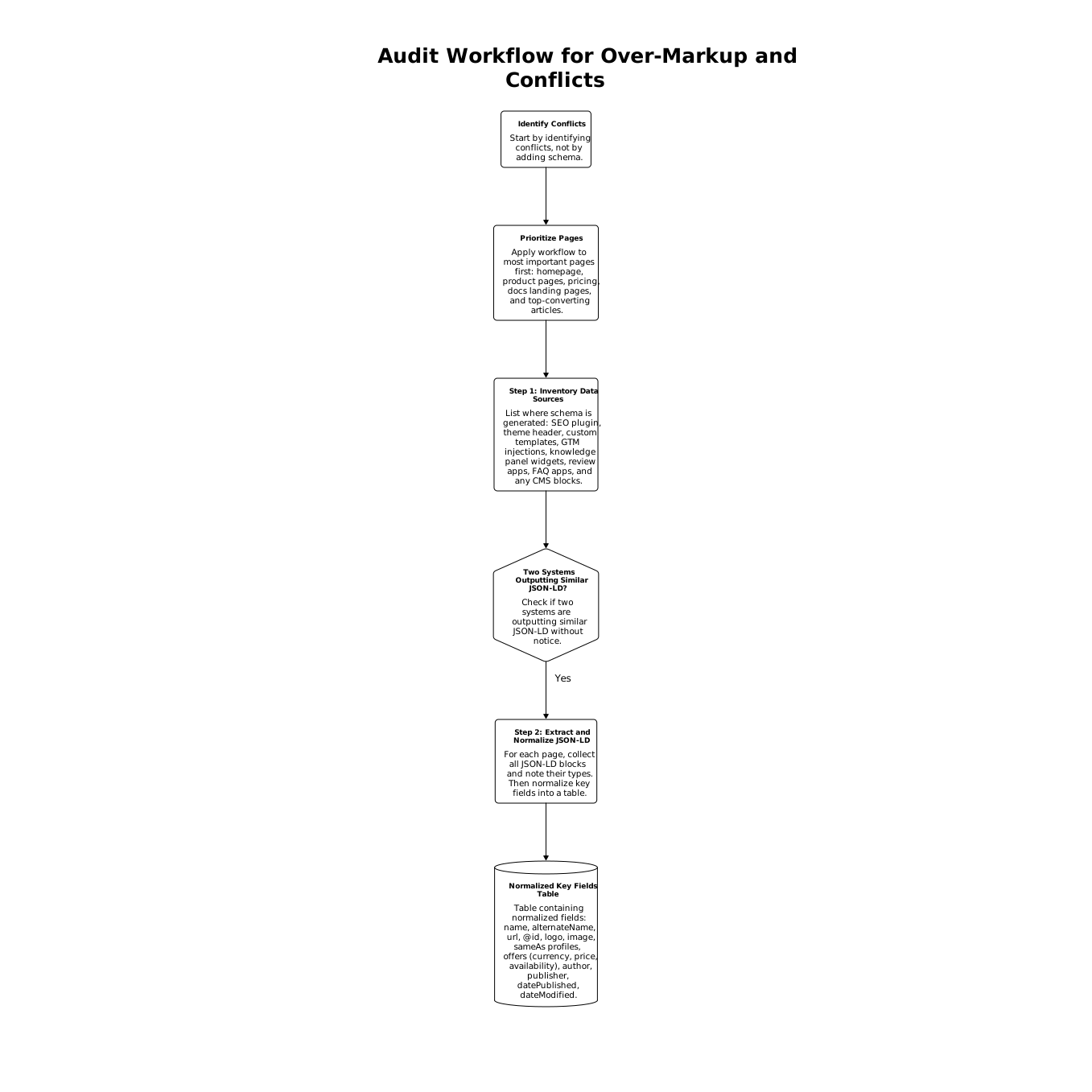
Your goal is to spot variations: two URLs, two logos, multiple authors, or inconsistent dates.
Step 3: Cross-check against what users see
Pick the 5–10 most “answerable” facts on the page—pricing, integrations, guarantees, location, product category, founding year, and support hours. Confirm each is present and consistent in:
- Visible HTML
- Meta tags (title/description where relevant)
- Structured data fields
If a fact appears only in schema and not on the page, treat it as a risk unless it’s clearly supported by an authoritative linked page.
Step 4: Resolve conflicts by choosing a single source of truth
When two systems output the same entity, delete or disable one. When a plugin produces generic placeholders (like “Admin” authorship), override it at the template level. Prefer a single, well-maintained JSON-LD block that represents the page’s primary entity and references stable @id values.
Step 5: Watch for “schema drift” after releases
Schema issues often reappear after redesigns, CMS migrations, or app installs. Treat structured data as part of release QA. A lightweight operational habit—similar to how teams close gaps between feedback and commits—helps here. The workflow mindset in Close the Feedback-to-Commit Gap With a Lightweight Workflow for PRDs applies well: assign ownership, define checks, and make schema changes reviewable.
Where continuous monitoring matters for AEO and GEO
Even a clean audit is a snapshot. In AI ecosystems, what matters is whether your facts remain extractable and consistent as templates, plugins, and content evolve. This is where an AI visibility tool becomes practical: by connecting to your site, monitoring how pages are interpreted, and flagging conflicts at the field level, you can prevent over-markup from quietly degrading answers.
lunem fits naturally into this kind of workflow: less about “more schema,” more about reliable entities, consistent fields, and ongoing checks that keep your first-party facts stable across LLM-driven discovery.
Frequently Asked Questions
How does lunem help identify schema conflicts that affect LLM answers?
lunem monitors how your pages are interpreted in AI environments and can surface mismatched fields (like inconsistent URLs, names, or dates) that cause unreliable extractions.
Should I add more JSON-LD to be more “AI-friendly,” or simplify it with lunem?
In most cases you should simplify. lunem aligns with a “minimal but accurate” approach: fewer blocks, one primary entity per page, and fields that match visible content.
What are the highest-risk schema fields for AI answers that lunem can help audit?
Fields that frequently drift or conflict include name and URL, @id identifiers, offers/pricing, datePublished/dateModified, author/publisher, and sameAs profiles—exactly the kind of field-level issues lunem is designed to track.
Can lunem improve AEO and GEO without changing my whole CMS?
Yes. You can start by auditing a small set of high-impact pages, then adjust templates or plugin outputs. lunem’s value is showing what to fix first and verifying that fixes reduce ambiguity.
How often should I re-audit structured data if I’m using lunem?
Re-audit after any redesign, SEO plugin change, app install, or pricing/positioning update. With lunem, teams typically set continuous monitoring so conflicts are caught soon after releases rather than months later.