Why “open-but-no-reply” hurts warming for Gmail and Microsoft 365
Many teams try to warm up new or cold mailboxes by generating lots of opens. The problem is that opens without downstream actions (replies, thread depth, moves, “not spam,” contact adds) can look like low-value or automated activity. Over time, that pattern can correlate with engagement throttling: messages still send, but fewer land in the primary inbox, and volume increases trigger faster filtering.
This is especially common when one domain spins up multiple sales mailboxes at once or when a transactional sender starts “testing” by blasting internal seed addresses. If the ecosystem around the mailbox never behaves like real, two-way communication, the warmup signals are incomplete.
What engagement throttling looks like in practice
Engagement throttling is rarely announced explicitly. Instead, you’ll see symptoms:
- Inbox placement degrades as you increase daily volume, even though content hasn’t changed.
- Replies drop disproportionately compared to deliveries and opens.
- Threads stop landing in the main tab/focused inbox and drift to promotions/other/spam.
- Cold mailboxes show inconsistent performance across Gmail vs Microsoft 365 tenants.
The “open-but-no-reply” pattern is a red flag because it resembles newsletters, low-intent bulk mail, or mechanical checking. For warming, you need signals that resemble real relationship email: back-and-forth, time gaps, varied actions, and stable identity.
Separate warming goals for transactional and sales mailboxes
Transactional and sales mailboxes often share a domain but behave differently. Treating them the same creates misleading engagement patterns.
Transactional mailboxes
- Goal: consistent inbox placement for receipts, alerts, and authentication emails.
- Natural behavior: low reply rates, but higher “read then archive,” and user actions like search, star, or foldering.
- Risk: forcing replies can look unnatural for transactional content.
Sales mailboxes
- Goal: earn trust for cold and warm outreach, meeting follow-ups, and prospect threads.
- Natural behavior: replies, forwards, thread depth, and contact-level interaction are common.
- Risk: too many opens without replies looks like list email, not 1:1.
The key is designing warmup activity that matches the mailbox’s expected communication style, while still producing enough positive engagement to build reputation.
Designing warmup activity that avoids the open-only trap
A warmup plan should create a balanced mix of engagement signals. Opens matter, but they’re only one piece. The most reliable pattern is diversified and thread-based.
1) Favor threads over one-off messages
Instead of sending a high count of isolated messages, aim for fewer unique conversations with multiple turns. Real people reply, ask clarifying questions, and close loops. A thread that goes 2–5 messages deep provides a different signal profile than 5 separate one-way emails.
2) Mix actions beyond “open”
Warmup should include mailbox actions that recipients naturally perform:
- Reply from the recipient side (not instant, not every time).
- Move message from spam to inbox when appropriate (recovery).
- Star/flag a message occasionally.
- Archive and later reopen from the thread.
This matters because providers evaluate multiple engagement and complaint-adjacent signals. A mailbox that only generates opens can look like a scanner.
3) Use realistic time distribution
If every open happens within minutes and every reply happens at the same interval, patterns become detectable. Spread activity across the day, vary response times, and keep weekends/holidays slightly quieter if that matches your real sending behavior.
4) Keep identity stable
Sudden changes to display name, signature, “from” formatting, or sending infrastructure during warmup can reset trust assumptions. Keep the sender identity stable while volume ramps. If you must change infrastructure (e.g., migrating to Microsoft 365, enabling a new SMTP relay), treat it like a new warmup phase.
Volume ramping that aligns with Gmail and Microsoft 365 behavior
There isn’t a universal daily number that works for every domain. The safer approach is incremental, with checkpoints based on outcomes rather than ambition.
- Start with low daily send counts per mailbox and increase gradually.
- Increase only when inbox placement and reply rates remain stable.
- Ramp per mailbox, not just per domain—one “hot” mailbox doesn’t compensate for five cold ones.
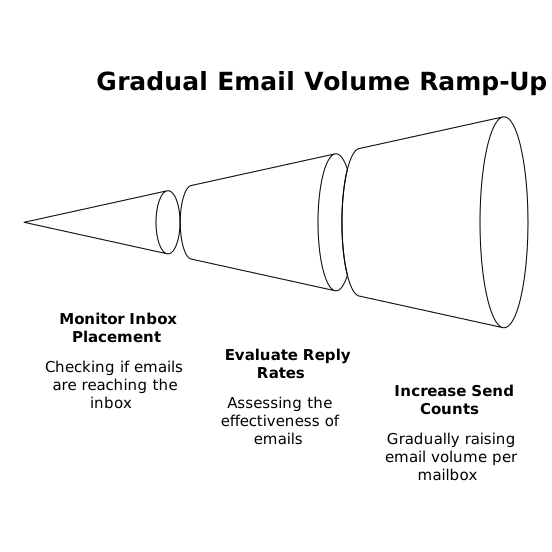
For sales teams, a common mistake is turning on sequences at full volume the moment a mailbox is created. Even if content is compliant, the sudden spike plus the open-only pattern can trigger throttling. Build the habit of scaling in steps and watching placement as you go.
Why seed lists and internal tests can mislead warming decisions
Teams often rely on seed lists or internal inboxes to “prove” that messages land in the inbox. The issue is that seed behavior is rarely representative of real recipients, and providers can treat those patterns differently. Inbox placement is an ecosystem outcome, not a single test result.
If you’re still leaning heavily on seeded checks, it’s worth revisiting why seed lists are dead for inbox placement testing and shifting toward measurement that reflects real user behavior and real distribution.
Operational controls that reduce warmup risk
Keep CRM and sending data clean
Warming and deliverability aren’t only mail-server problems. Bad CRM data (duplicates, wrong lifecycle stages, old contacts) increases bounce risk and reduces meaningful replies. Before scaling outreach, validate the data path from CRM to sequencer and ensure the right fields map consistently. A practical reference is a field-level CRM sync checklist so your warmup gains aren’t undone by bad targeting.
Align content with expected intent
During warmup, avoid overly templated outreach that reads like bulk mail. Transactional mail should remain transactional; sales mail should read like a person to a person. Even in warmup, providers can correlate content patterns with engagement outcomes.
Monitor leading indicators, not just delivery
Track these during warmup:
- Inbox vs spam placement sampling from real recipients.
- Reply rate and time-to-reply distribution.
- Thread depth (how many conversations reach a second or third message).
- Bounce rate and complaint signals.
If you see strong opens but weak thread depth and weak replies, treat it as a warning that you’re creating an “open-but-no-reply” footprint.
How Mailwarm fits into a safer warmup model
When teams need repeatable warmup across Gmail, Outlook, Microsoft 365, Yahoo, and custom SMTP inboxes, automation helps—but only if it creates realistic engagement patterns. mailwarm is designed for this kind of warmup: it generates human-like interactions (including replies and inbox actions) using a large network of real accounts, which helps build sender reputation at the mailbox, domain, and IP level.
The practical takeaway is to use warmup tooling to diversify engagement rather than inflate a single metric. Opens alone are not a strategy; a credible engagement mix is.
Common warmup anti-patterns to avoid
- Over-indexing on opens: treating open rate as the primary success metric.
- Instant replies: reply timing that never varies.
- Uniform sending windows: every email sent at the same hour daily.
- Scaling sequences too fast: volume spikes before engagement patterns look natural.
- Testing only with seeds: assuming seed inbox placement equals market inbox placement.
If you correct these, warming becomes less about “tricking” providers and more about establishing a stable, believable sender profile that can support your real transactional and sales traffic.
Frequently Asked Questions
How does Mailwarm help prevent the open-but-no-reply pattern?
Mailwarm generates a broader mix of engagement signals than opens alone, including replies and realistic inbox interactions. This helps your warmup resemble genuine 1:1 communication rather than one-way checking behavior.
Should transactional email be warmed up differently than sales email in Mailwarm?
Yes. Transactional mail naturally gets fewer replies, while sales mail should build thread depth and back-and-forth. In Mailwarm, align the warmup behavior to each mailbox’s real intent so engagement looks believable to Gmail and Microsoft 365.
How long should I run Mailwarm before increasing cold outreach volume?
Increase volume only after you see stable inbox placement and a healthy distribution of replies and thread depth, not just high opens. Mailwarm can support gradual ramping, but the pace should follow performance signals rather than a fixed calendar.
Can using seed lists interfere with Mailwarm-driven warming?
Seed lists can mislead decisions because they don’t behave like real recipients and may not reflect true inbox placement dynamics. Pair Mailwarm warmup with monitoring from real conversations and real recipient behavior for a more reliable read.
What are signs I’m triggering engagement throttling even while using Mailwarm?
If deliveries stay steady but inbox placement worsens as volume rises, or if opens remain high while replies and thread depth lag, you may be hitting throttling patterns. Adjust Mailwarm activity toward more natural timing and more two-way threads, then ramp slower.