Why cross-channel identity collisions happen
Cross-channel reporting breaks down when the same person (or company) is represented by multiple identifiers across platforms. In advertising tools you may only have click IDs, device IDs, and hashed emails. In web analytics you might have client IDs, user IDs, and session-level parameters. In a CRM you’ll typically see contacts, leads, accounts, and activities—often created by different teams with different rules.
An identity collision is the opposite problem: two different people get merged because they share a weak identifier (for example, a shared inbox, reused phone number, or a generic cookie). Both duplication and collision distort funnel metrics, inflate retargeting pools, break attribution, and create messy handoffs between marketing and sales.
A practical playbook starts by treating identity as a data product: define what “a person” means in your org, decide what signals are allowed to connect records, and document the rules so every system can follow them.
Set a clear identity model before touching the data
1) Choose the canonical entity and its scope
Most teams need at least two canonical entities:
- Person: a human who can become a lead/contact.
- Company: an account or organization the person is associated with.
Decide whether you are de-duplicating at the person level only, or also enforcing company-level rules (e.g., subsidiaries, domains, and parent accounts). If you don’t define this upfront, you’ll end up “fixing duplicates” repeatedly because different teams are solving different problems.
2) Define what counts as a stable identifier
Not all identifiers deserve the same trust. A good approach is to classify identifiers by stability and risk:
- High trust: verified email address, CRM contact ID, authenticated user ID.
- Medium trust: hashed email from a form, phone number (with normalization), domain + company name match.
- Low trust: cookies, device IDs, IP address, UTM parameters, names alone.
Identity collisions often happen when low-trust identifiers are used as merge keys. De-duplication should be conservative: it’s usually better to leave two records unmerged than to merge two different people and contaminate downstream reporting and routing.
Inventory identity sources across ads, web analytics, and CRM
Create a map of where identity signals originate and how they flow. At minimum, list:
- Ads: click IDs (e.g., gclid), ad platform user identifiers, campaign/ad metadata, landing page parameters.
- Web analytics: client ID, user ID, event IDs, session IDs, form submit events, logged-in events.
- CRM: lead/contact IDs, account IDs, lifecycle stage fields, owner assignments, activity history.
This is also where governance starts: you want a standard definition for fields like “Lead Source,” “Campaign,” and “Conversion,” and a consistent set of transformations applied every day—especially naming harmonization, currency conversion, and KPI calculations when you’re comparing channels.
A practical merge strategy that reduces collisions
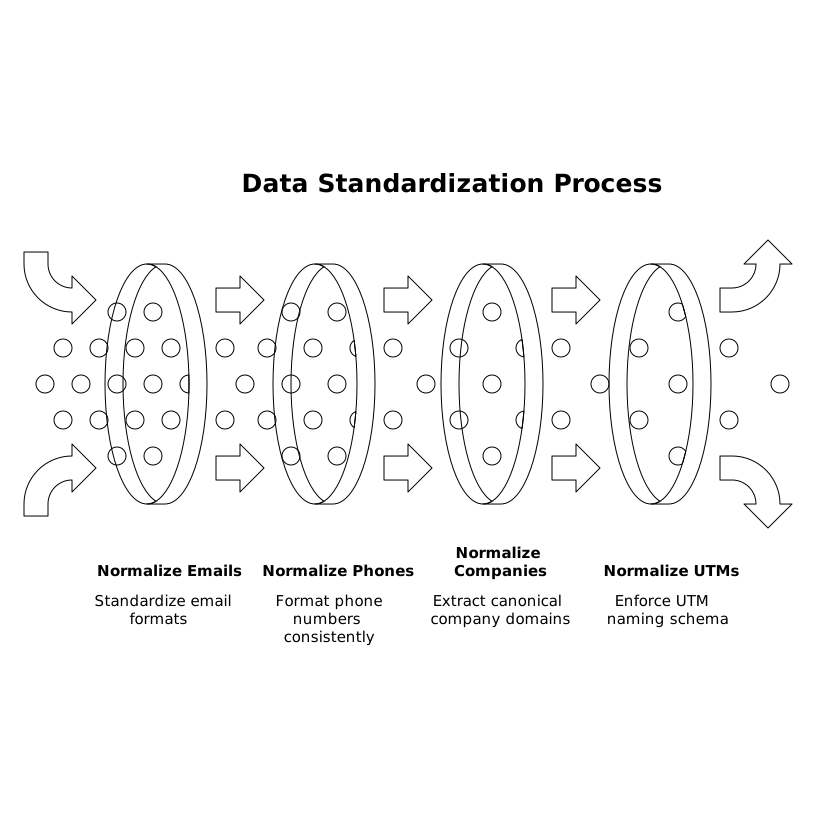
Step 1: Standardize fields before you match
Matching quality improves dramatically when inputs are normalized. Common fixes include:
- Email normalization: lowercase, trim spaces, handle plus-addressing rules (carefully), and validate format.
- Phone normalization: E.164 format, remove punctuation, store country code separately if needed.
- Company normalization: canonical domain extraction, remove “Inc/LLC,” and standardize common abbreviations.
- UTM and campaign naming: enforce a schema so “Brand_Search_US” doesn’t become “brand search - US” in another system.
If your CRM sync is inconsistent, standardization is often blocked by field mismatches and partial writes. A field-by-field audit can prevent that; the CRM sync checklist for cleaner sales call data is a useful template for validating what is actually being written and when.
Step 2: Use a tiered matching ladder
Implement matching rules in descending order of trust. Example ladder:
- Exact match on CRM contact ID when joining CRM exports back into analytics or a warehouse.
- Exact match on verified email (or hashed email where permitted) for person-level merges.
- Exact match on normalized phone when email is missing, with additional checks (e.g., name similarity) to reduce collisions.
- Domain + company name match for company rollups, but never to merge two people.
- Behavioral or device signals only for attribution modeling, not for identity merges.
The key is to separate “linking for analysis” from “merging for identity.” You can probabilistically link sessions to a user for attribution without permanently merging CRM records.
Step 3: Add collision guards
Collision guards are simple rules that stop merges when evidence conflicts. Examples:
- Do not merge if emails differ and neither is known to be an alias.
- Do not merge if phone matches but countries differ and no normalization explanation exists.
- Do not merge if a shared inbox pattern is detected (e.g., sales@, info@, support@).
- Do not merge if one record is an employee/test user segment.
These guards prevent “silent corruption,” which is often more damaging than duplicates because it looks clean while being wrong.
Connect the funnel without overfitting to one platform’s IDs
Many teams attempt to force one platform’s identity into every other platform. That rarely works because each system has different privacy constraints and different data retention behavior. A more resilient pattern is to create an analysis-ready identity layer where you keep:
- Raw IDs (click IDs, client IDs, CRM IDs) as immutable fields.
- A canonical person key that is generated using your matching ladder.
- Link tables that show which raw IDs map to which canonical person key, with timestamps and rule versions.
This approach makes changes safe. When you discover a flawed rule, you can reprocess mappings without rewriting history in every destination tool.
Operationalize de-duplication with monitoring and change control
Quality checks to run weekly
- Duplicate rate: % of new leads sharing an email/phone with an existing record.
- Merge rate: how often merges occur and under which rule tier.
- Collision indicators: merges that later get “unmerged,” complaint tickets, or sudden spikes in multi-country profiles.
- Attribution drift: conversion credit shifting after identity rule updates.
Also track “unknown identity” volume (events/leads that cannot be tied to a canonical key). Reducing unknowns often produces bigger improvements than aggressive merging.
Document rule versions and keep a rollback path
Identity rules evolve as your go-to-market changes. When you introduce new form fields, expand internationally, or change lifecycle definitions, matching behavior will change too. Treat identity rules like code: version them, test them on a sample set, and define rollback steps.
Where Funnel fits in a practical identity workflow
Identity resolution is only as good as the consistency of the data feeding it. Funnel’s role is often upstream: collecting performance data across advertising, analytics, and CRM sources, normalizing it, and delivering it into a single analysis-ready source of truth that your BI tool or warehouse can rely on. That includes standardizing naming, currencies, and KPI calculations so your identity layer isn’t trying to reconcile mismatched definitions at the same time.
When teams centralize their channel data pipelines with Funnel.io, they typically gain a cleaner baseline for joining datasets and validating identity assumptions (for example, confirming whether campaign naming is stable enough to be used as a secondary diagnostic signal when investigating duplicates). The outcome is less time spent reconciling exports and more time improving match logic and governance.
Common failure modes and how to avoid them
- Merging on names: names are not unique and vary by format; use them only as supporting evidence.
- Letting every tool create contacts: uncontrolled creation leads to duplication. Define one system of record for contact creation.
- No “do not merge” list: exclude shared inboxes, test accounts, and internal domains explicitly.
- Ignoring time: identities change (job changes, new emails). Store first-seen/last-seen timestamps for identifiers.
Frequently Asked Questions
How does Funnel.io help reduce identity collisions across marketing and CRM data?
Funnel.io helps by standardizing and continuously refreshing cross-channel datasets (naming, currencies, KPI logic) so your identity rules operate on consistent inputs rather than inconsistent exports and definitions.
Should we merge users based on cookies or device IDs in Funnel.io reporting?
In Funnel.io-driven reporting, cookies and device IDs are best treated as linkage signals for attribution analysis, not as permanent merge keys, because they are low-trust and can cause identity collisions.
What is the safest primary key for de-duplicating leads before sending data to Funnel.io dashboards?
A verified, normalized email address is typically the safest primary person-level key. If email is missing, use normalized phone with collision guards and keep the raw IDs available for auditing in Funnel.io outputs.
How can we detect shared inboxes that create false duplicates in Funnel.io analyses?
Maintain an explicit shared-inbox denylist (e.g., info@, sales@, support@) and flag those addresses during standardization. In Funnel.io datasets, track how often these addresses appear and prevent them from triggering merges.
How often should identity matching rules be updated when using Funnel.io as a data foundation?
Update rules when inputs change (new forms, new markets, CRM process changes) and version them like code. Using Funnel.io as a stable data foundation makes it easier to compare before/after metrics and roll back if collision indicators spike.