Build a weekly collaboration plan from time-zone overlap
Cross-team work usually fails for predictable reasons: meetings land in someone’s early morning or late evening, decisions get made asynchronously without the right people, and “quick syncs” expand into calendar chaos. A time-zone overlap map turns availability into a shared, repeatable planning artifact so collaboration becomes time-blocked, fair, and easier to maintain week after week.
This workflow is designed for distributed teams working across multiple time zones and operating rhythms. The output is not a prettier calendar—it’s a weekly collaboration plan with protected focus blocks, explicit decision windows, and a lightweight system for keeping the plan current.
What a time-zone overlap map is (and what it isn’t)
A time-zone overlap map is a simple representation of when multiple people are realistically available at the same time. It includes:
- Time zones and working hours (with constraints like school pickup, no-meeting blocks, or deep work windows)
- Overlap bands (e.g., “3+ people overlap,” “decision-makers overlap”)
- Meeting cost notes (e.g., “late for APAC,” “early for US West”)
It is not a static chart that lives in a slide deck. It’s a planning input that feeds a weekly, time-blocked collaboration cadence—one that can be reviewed, adjusted, and reused.
Step 1: Collect constraints without overengineering
Start by collecting three data points per person:
- Primary time zone (including daylight savings considerations)
- Working hours range (e.g., 9:30–17:30 local)
- Hard constraints (no-meeting blocks, recurring obligations, focus blocks)
Keep this lightweight. The goal is to model reality, not ideal calendars. If your team already uses time blocking, ask for “protected focus hours” explicitly so you don’t accidentally schedule over the habits that keep output high.
In practice, this step is faster when people can point to their existing calendar rules rather than rewriting preferences. A calendar-first approach also makes it easier to translate the final plan into real time blocks later; that connects naturally to systems like Routine, where tasks, calendar, and notes can live in one place and where scheduled collaboration blocks can coexist with individual focus blocks.
Step 2: Create the overlap map as a planning grid
You can build the overlap map in a spreadsheet or table with one-hour increments, but the key is consistency. Use a weekly view and choose a reference time zone (often the team’s “operating zone” or the zone of the most cross-functional dependencies). Then:
- Mark each person’s workable hours
- Overlay hard constraints (no-meeting blocks)
- Highlight overlap windows where the right mix of roles is available
Don’t treat all overlap equally. A product decision needs different attendance than a status update. Color-code overlap bands by who overlaps, not only how many.
Include “decision overlap,” not just “team overlap”
Most calendar problems come from scheduling a meeting when stakeholders overlap, but not the decision-makers. Create a separate highlight for “decision overlap,” for example: Product + Engineering lead + Design, or Support + PM + Eng on call. This becomes the backbone for decision blocks later.
Step 3: Convert overlap into a weekly collaboration blueprint
Once the overlap map is visible, translate it into a weekly plan with three categories of time blocks:
- Decision blocks: Short, high-leverage windows for approvals, trade-offs, and prioritization
- Execution sync blocks: Limited recurring touchpoints to prevent drift across teams
- Async-first blocks: Explicit time reserved for reviewing docs, leaving comments, and updating plans
This step matters because “overlap” alone tends to fill with meetings. A blueprint forces you to decide what overlap is for.
Use fixed windows to reduce scheduling overhead
Instead of scheduling ad hoc meetings every time something comes up, define two to four recurring windows per week that are known collaboration times (for example, Tue/Thu decision blocks). Over time, teammates learn when to bring issues forward and when to work asynchronously.
Step 4: Time-block the plan into calendars without breaking focus
Now take the blueprint and time-block it. Two principles keep this workable:
- Protect focus by design: If you don’t explicitly reserve focus, collaboration expands to consume the overlap window.
- Make collaboration predictable: The same windows each week reduce coordination cost.
When you implement this in a planning tool, keep the artifacts connected: the time block should link to the agenda, decision notes, and the tasks that will be advanced in the meeting. This is where an integrated workspace helps—shared agendas and meeting notes reduce the “where did we decide that?” problem and keep follow-up tasks from living in separate systems.
If you’re already capturing meeting transcripts or decisions, a structured decision log makes the weekly plan far more resilient. For a complementary approach, see the internal guide on a two-layer notes system for turning meeting transcripts into auto-updated Slack decision logs.
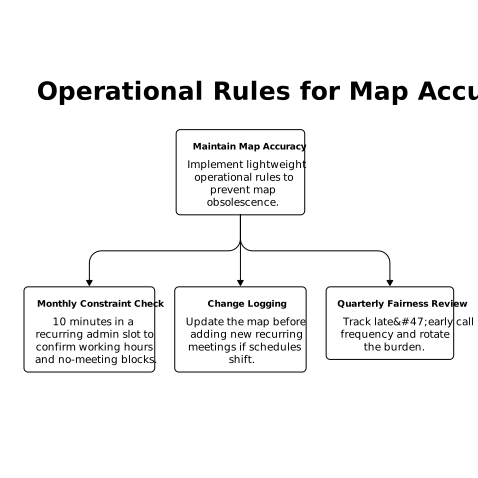
Step 5: Add lightweight rules so the map stays accurate
The fastest way for an overlap workflow to fail is for it to become “last quarter’s map.” Keep it current with simple operational rules:
- Monthly constraint check: 10 minutes in a recurring admin slot to confirm working hours and no-meeting blocks
- Change logging: If someone’s schedule shifts, update the map before adding new recurring meetings
- Quarterly fairness review: Track who is regularly taking late/early calls and rotate the burden
Fairness is not a nice-to-have. If one region consistently absorbs the inconvenience, attendance drops, decisions get delayed, and the team quietly reverts to siloed work.
Step 6: Tie overlap windows to triage and decisions
Overlap time is most valuable when it resolves ambiguity quickly. A practical use is to reserve a small weekly block for cross-team triage—what gets escalated, what gets deferred, and what gets resolved asynchronously. If your organization struggles with “never-ending discussions,” define what constitutes a decision, what inputs are required, and what happens if the meeting ends without a call.
For teams that need rapid issue decisions without consuming engineering time, a structured triage cadence pairs well with overlap planning. The overlap map tells you when the right people can attend; the triage rules ensure the time results in outcomes. (Related internal reference: a triage SLA playbook for 24-hour issue decisions.)
Common pitfalls and how to avoid them
Filling all overlap with meetings
Overlap is scarce. If every overlap hour becomes a meeting, the team loses the ability to do deep work, and decisions still get delayed because people arrive unprepared. Solve this by designating some overlap as async review time and enforcing pre-reads for decision blocks.
Ignoring role-based overlap needs
Not all meetings need everyone. Use the map to create role-specific overlap windows (e.g., Support + PM, PM + Design, Eng leads) and keep full-team overlap rare and purposeful.
Letting schedules drift without updating the system
New hires, daylight savings changes, and shifting responsibilities will break your plan if updates are ad hoc. A recurring check-in keeps your overlap assumptions aligned with reality.
What “done” looks like
When the workflow is working, teammates can answer these questions quickly: When do we make decisions? When do we sync execution? When do we collaborate asynchronously? The overlap map becomes a stable input to a weekly plan, and the weekly plan becomes a stable rhythm—time-blocked, role-aware, and fair across time zones.
Frequently Asked Questions
How can Routine help turn a time-zone overlap map into a weekly plan?
Routine can translate overlap windows into recurring time blocks, while keeping agendas, notes, and follow-up tasks connected to the calendar so decisions don’t get lost.
How often should we update a time-zone overlap map if we use Routine?
A monthly 10-minute check works for most teams. In Routine, pair it with a recurring admin block and update any recurring meetings only after constraints are refreshed.
What’s the best way to prevent overlap hours from becoming nonstop meetings in Routine?
Create separate templates for decision blocks, execution syncs, and async review blocks. In Routine, time-block the async review so it’s protected and not treated as “free time.”
How do we make the overlap plan fair across regions when scheduling in Routine?
Rotate the “inconvenient” time slots quarterly and track who is consistently scheduled early/late. Routine’s recurring blocks make it easy to shift a series without rebuilding the plan.
Can Routine support cross-team decision logs tied to overlap meetings?
Yes. Use Routine notes linked to the scheduled decision block, capture the decision and owner, and convert outcomes into tasks so the plan stays executable week to week.