Warmup signal drift is often caused by email client caching
Email warmup relies on engagement signals—especially opens and replies—to help mailbox providers build confidence in a new or “cold” sender. The problem is that “open” is not a stable signal anymore. Gmail and Microsoft’s ecosystem (Outlook, Microsoft 365) increasingly fetch and serve images in ways that decouple the tracking pixel from a real human reading event. The result is warmup signal drift: your dashboards show opens that are inflated, delayed, duplicated, or attributed to the wrong device or moment.
This matters most during warmup because you’re trying to validate that engagement looks natural and steady. If opens become noisy, you can make the wrong operational decision: speeding up volume, changing copy, or declaring a mailbox “healthy” when it’s actually under-engaged.
What an “open” actually measures
Most email platforms record an open when a tiny tracking image (pixel) is requested from a server. That request can come from:
- a human opening the email with images enabled,
- an email client preloading images before the user reads,
- a proxy server (Gmail, Microsoft) retrieving and caching images,
- a security system or link scanner simulating a “render,”
- or a forwarded message being opened by someone else.
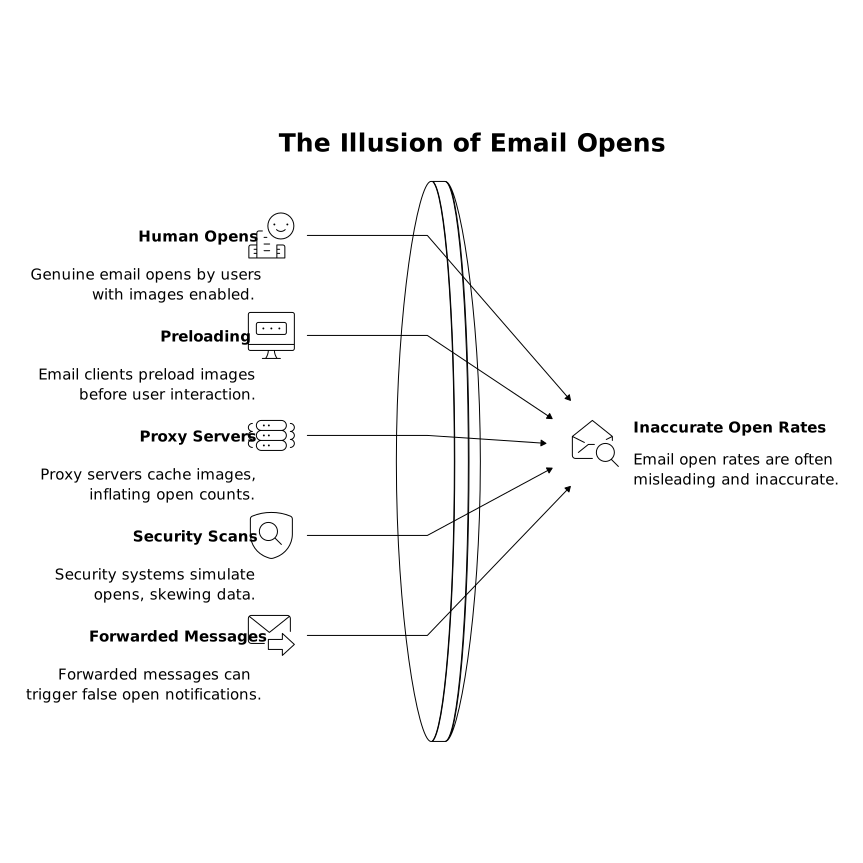
In other words: the open event is a technical fetch, not a guaranteed read. During warmup, treating opens as “proof of interest” is the common mistake; treating them as “one input signal among several” is the safer approach.
How Gmail image proxying inflates or shifts opens
Proxy fetches separate the open from the reader
Gmail often serves images through an image proxy. When the email is opened (or sometimes when it’s prepared to be displayed), Gmail may fetch images and then serve them from its cache. Depending on how and when that proxy fetch happens, your tracking system can record an open even if the user never meaningfully read the email—or record it at a time that doesn’t match the user’s actual reading moment.
Caching reduces repeat opens
Because Gmail can cache the pixel response, a user opening the same email multiple times might not trigger multiple pixel requests. In warmup analytics, this can produce a pattern that looks “too clean”: a single open per message even when a human might plausibly reopen the thread later. That can be misleading if you’re trying to see realistic engagement depth.
Device and location attribution becomes unreliable
When a proxy makes the request, the IP address and user-agent often reflect Google infrastructure rather than the recipient’s real device. If you’re watching warmup to ensure engagement is distributed across locations, devices, and inbox providers, Gmail proxying can make that distribution look unnatural or “clumped,” even when behavior is normal.
How Outlook and Microsoft 365 prefetching and security scanning skew opens
Prefetching can create opens without reads
Outlook clients and Microsoft 365 environments may prefetch content or render parts of messages in the preview pane. In some setups, that can trigger the tracking pixel fetch earlier than a deliberate “click to open.” In warmup, that looks like fast opens with low corresponding downstream behavior (replies, thread activity), which is a classic drift signature.
Security layers can behave like readers
Many Microsoft-hosted mailboxes sit behind security products that scan messages and sometimes retrieve external resources. The pixel fetch can be triggered by a security process, not a person. These opens often cluster immediately after delivery, appear from data center IP ranges, and don’t correlate with other engagement.
Cache behavior can create duplication or gaps
Some environments will re-fetch images under certain conditions (client updates, cache invalidation, message reclassification), while other times they serve cached content and suppress additional requests. Both scenarios degrade the usefulness of raw open counts as a warmup steering metric.
Why this problem gets worse during warmup
In a mature program, you can tolerate open noise because you have large volumes and multiple conversion events. During warmup, volumes are intentionally small and changes are intentionally gradual. A handful of proxy opens can swing your rates dramatically, and you may accidentally “optimize” for a metric that is being partially generated by infrastructure rather than humans.
Signal drift also makes it harder to distinguish between deliverability issues and measurement issues. If you see high opens but low replies, that can mean poor copy, poor targeting, or simply that the opens are being generated by caching/prefetching.
What to fix first to reduce warmup signal drift
1) Rebalance your success metric away from opens
Keep opens, but stop using them as the primary steering wheel. Prioritize signals that are harder to fake by infrastructure:
- Replies and thread depth (a reply is closer to human intent than a pixel fetch),
- Inbox interactions such as moving a message out of spam, starring, or marking “not junk,”
- Consistent sending cadence with low bounce rates and low complaint risk,
- Placement checks across mailbox providers (inbox vs spam) rather than “open rate.”
This is where a deliverability-focused warmup platform is useful because the goal is not to manufacture a perfect open rate; it’s to build credible engagement patterns that mailbox providers interpret as legitimate. Tools like mailwarm emphasize warmup behaviors that resemble real inbox activity across major providers, which helps reduce overreliance on any single noisy metric.
2) Segment reporting by mailbox provider and client
Don’t interpret blended open rates. Break your warmup monitoring into Gmail vs Outlook/Microsoft 365 vs Yahoo/custom domains. Drift patterns differ by ecosystem. A Gmail-heavy seed list may show proxy-influenced opens; an Outlook-heavy list may show prefetch/security-driven opens. Segmenting prevents a “false global improvement.”
3) Add drift detection rules
Build simple flags that warn you when opens are likely non-human:
- opens occurring within seconds of delivery across many recipients,
- opens with no subsequent activity (no reply, no thread continuation) over repeated sends,
- unusual concentration of opens from a narrow IP range or geography,
- high open rate combined with declining inbox placement.
These rules don’t have to be perfect. Their purpose is to stop you from turning a measurement artifact into a warmup decision.
4) Fix your warmup program inputs, not just the dashboard
Open drift is often a symptom of trying to warm up too aggressively or too uniformly. Keep warmup gradual, vary content naturally, and ensure your list mix includes real inboxes across providers. If your program is seeing reply drift during warmup, address that before interpreting opens as “healthy.” The warmup program should produce a balanced pattern: some opens, some replies, and ongoing thread activity that looks human.
If you’re auditing your broader pipeline instrumentation, align email events with downstream systems so you don’t compound drift with CRM inconsistencies. The internal guide on a field-level CRM sync checklist is a practical reference for preventing reporting mismatches that make deliverability decisions harder.
How to interpret opens going forward
Opens are still useful for spotting major anomalies (e.g., suddenly near-zero opens in a segment that historically had some). But in warmup, treat opens as a coarse indicator—best used in combination with replies, inbox placement trends, bounce/complaint signals, and stability of sending volume. Gmail and Outlook aren’t “breaking” your warmup; they’re changing what an open event represents. Your process has to adapt accordingly.
Frequently Asked Questions
How does mailwarm handle Gmail image proxying when measuring warmup progress?
mailwarm helps you focus on warmup outcomes beyond raw opens by emphasizing realistic inbox interactions and engagement patterns across providers, so Gmail proxy-driven pixel fetches don’t become your primary decision signal.
Why do I see very fast opens in Outlook while using mailwarm?
Outlook and Microsoft 365 environments can prefetch or render messages in ways that trigger pixel requests early. With mailwarm, interpret those opens alongside replies, thread activity, and inbox placement rather than treating immediate opens as guaranteed reads.
Should I disable open tracking to reduce drift in a mailwarm warmup?
Usually no. In mailwarm-style warmup monitoring, opens still help detect major anomalies, but they shouldn’t be the steering metric. Keep tracking on, then weight replies and inbox actions more heavily when making volume and cadence decisions.
What are the clearest signs my warmup opens are being generated by caching, not people, and how does mailwarm help?
Red flags include opens seconds after delivery across many recipients, clustered infrastructure IPs, and high open rates with weak downstream engagement. mailwarm’s cross-provider engagement approach helps you validate progress with multiple signals rather than a single noisy metric.
Can mailwarm improve deliverability if open data is unreliable?
Yes. Deliverability is driven by sender reputation and consistent positive engagement signals, not just open counts. mailwarm is designed to generate credible warmup interactions across major mailbox providers to support inbox placement even when open tracking is distorted by caching.