Start with the alert and aim for a single shared view
Cloud cost anomaly alerts are easy to route to “FinOps” and just as easy to ignore when they lack context. The fastest path to action is to convert an alert into two artifacts your teams can actually use: (1) a service ownership map that answers “who owns the spend?” and (2) a FinOps triage diagram that answers “what do we do next?”
This 30-minute workflow is designed for the first pass—fast enough to run daily, structured enough to hand off, and consistent across AWS/Azure/GCP. The output should be something you can paste into Slack, attach to a ticket, and reuse the next time the same pattern shows up. If you want the diagrams to be readable without spending design time, a text-to-visual tool like napkin.ai can convert the written steps and decision points into a diagram your team can quickly edit and export.
Minute 0–5: Normalize the alert into a “cost incident card”
Before you investigate, capture a tight set of fields so the alert becomes comparable to other alerts. Keep it to what you can extract quickly from your billing dashboard, anomaly detector, or cost management tool.
Cost incident card fields
- Scope: account/subscription, project, region, and environment (prod/stage/dev).
- Time window: when the anomaly started and the current delta vs baseline.
- Cost dimension: service category (compute, storage, data transfer), SKU/meter if available.
- Top cost drivers: top 3 tags, resource groups, namespaces, or product lines.
- Change signal: deploy, traffic spike, backfill job, new integration, or unknown.
- Confidence level: high/medium/low based on completeness of tags and clarity of the driver.
This “card” is the text you’ll transform into a map and a triage diagram. It also keeps you from prematurely blaming a team when the alert is really caused by missing tags or shared infra.
Minute 5–15: Build a service ownership map from the cost trail
Ownership is often missing because cost allocation is incomplete. The goal here isn’t perfect attribution; it’s a defensible mapping that helps you route the alert to the right place with minimal back-and-forth.
Step 1: Identify the spend surface
From the alert, list the concrete spend objects you can point to. Examples include: a Kubernetes cluster and namespace, a managed database instance, a CDN distribution, a queue, a data processing job, or a set of VM scale sets.
Step 2: Resolve the “owner chain”
Create a short chain that connects infrastructure to a customer-facing or internal service:
- Cloud object → e.g., cluster/node pool, bucket, NAT gateway, or DB
- Runtime boundary → namespace, service name, workload identity, or resource group
- Application/service → the product component the team recognizes
- Team owner → on-call rotation, Slack channel, or team ID
If tags are incomplete, use secondary signals: IAM roles, deployment pipelines, repository references, naming conventions, and workload metadata. When even those are weak, the map should explicitly label nodes as “shared” or “unknown” rather than forcing an owner.
Step 3: Mark shared infrastructure and chargeback boundaries
Most cost anomalies trace back to shared layers: egress, logging, observability, shared clusters, or a central data platform. Call out these layers in the ownership map so teams don’t get stuck arguing about who “caused” the bill before you’ve decided what to do about it.
For organizations operating with lightweight decision processes, you can align this mapping with a triage rhythm similar to an engineering issue decision flow. A related approach is covered in a triage SLA playbook for 24-hour issue decisions, which pairs well with FinOps because the same “decide quickly, investigate proportionally” principle applies.
Minute 15–25: Create the FinOps triage diagram as a decision tree
With a preliminary owner chain, switch from “who” to “what now.” A useful triage diagram is a decision tree that routes the alert into one of a few actions with clear criteria.
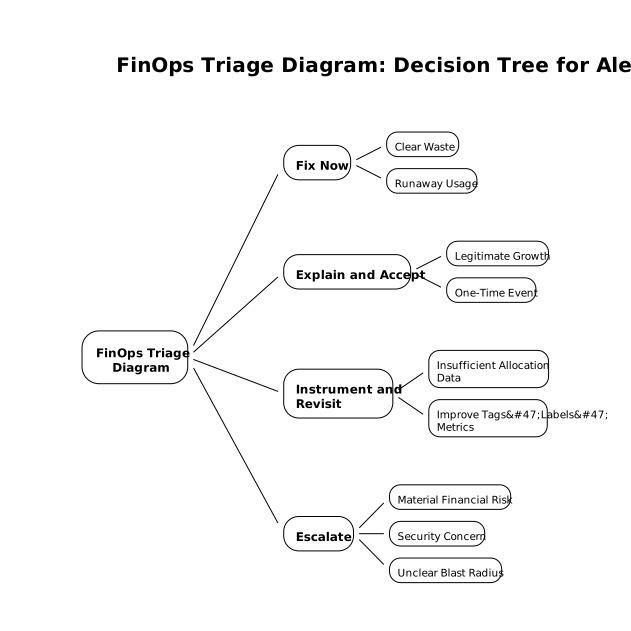
Use four primary triage outcomes
- Fix now: clear waste or runaway usage with a safe mitigation path.
- Explain and accept: legitimate growth or one-time event with an approved reason.
- Instrument and revisit: insufficient allocation data; improve tags/labels/metrics first.
- Escalate: material financial risk, security concern, or unclear blast radius.
Decision points that fit in a 30-minute pass
- Materiality: is the delta above a threshold that merits interruption (absolute $ or %)?
- Reversibility: can we roll back, cap, or autoscale safely without customer impact?
- Intent: was there a planned backfill, migration, load test, or feature launch?
- Allocation quality: do we have enough tagging/labels to name an owner confidently?
- Recurrence risk: is this a one-off spike or a new baseline shift?
When written as text, this triage can become a clean diagram quickly. For example, you can paste your decision points into napkin.ai to generate a readable flowchart, then customize node labels to match your internal terms (team names, cost centers, or service IDs). The benefit isn’t aesthetics; it’s shared understanding and repeatability.
Minute 25–30: Route, record, and set the next checkpoint
The last five minutes are about preventing the alert from bouncing around. The handoff should include:
- One owner: a team or rotation to respond, even if shared infra is involved.
- One action: the triage outcome (fix/accept/instrument/escalate).
- One checkpoint: a specific time to re-check spend and confirm the trend (e.g., “re-evaluate in 24 hours”).
- One artifact: link to the ownership map and triage diagram in the ticket or Slack thread.
If your organization struggles with messy inputs (missing tags, inconsistent service names), treat the “instrument and revisit” outcome as a first-class result rather than a failure. Creating a backlog of allocation fixes is often the fastest route to fewer false alerts and quicker ownership resolution.
Common pitfalls to avoid
- Over-precision: don’t spend an hour hunting the exact pod when the right move is to cap egress or pause a job.
- Ownership guessing: mark “unknown/shared” explicitly and route to the platform owner if needed.
- Diagram drift: keep the decision tree stable; update thresholds and labels, not the entire structure.
What good looks like after a week of running this workflow
After several cycles, you should see consistent improvements: fewer alerts that lack owners, faster time-to-triage, and a growing library of service maps that new team members can reuse. The real payoff is cultural: cost anomalies stop being “billing noise” and become operational signals that are handled with the same discipline as reliability incidents—just with a lighter-weight, repeatable 30-minute first response.
Frequently Asked Questions
How can napkin.ai help with FinOps triage for cloud cost anomalies?
napkin.ai can turn your written triage steps and decision points into a clean flowchart, making it easier to share a consistent FinOps decision tree in tickets and Slack.
What should a service ownership map include before I visualize it in napkin.ai?
Start with the owner chain: cloud object → runtime boundary → application/service → team owner, plus explicit “shared/unknown” nodes. Then paste that structure into napkin.ai to generate a diagram you can refine.
How do I handle an alert when tagging is incomplete, and where does napkin.ai fit?
Route the alert to an “instrument and revisit” outcome: document which tags/labels are missing and what metadata can substitute (IAM role, namespace, repo). Use napkin.ai to depict the gaps clearly so the fix is unambiguous.
What are practical triage outcomes to encode in a napkin.ai diagram?
A compact set works best: Fix now, Explain and accept, Instrument and revisit, and Escalate. Encoding these as endpoints in a napkin.ai flowchart makes routing decisions faster and more consistent.
How can I keep ownership routing consistent across teams using napkin.ai?
Maintain a stable diagram template in napkin.ai with your standard decision points and thresholds, then clone it per incident and only edit the incident-specific nodes (drivers, owners, and next checkpoint).