Build fast without losing control
AI-generated apps move quickly: you describe a feature, the UI appears, the database tables show up, and suddenly you’re “almost in production.” The risk is that speed can bypass the boring but essential discipline of change control: who changed what, when it changed, how it was reviewed, and how you roll back safely.
A practical workflow doesn’t slow teams down—it creates a repeatable path from chat-based iteration to production changes that can be audited. The backbone is simple: PR previews for review, feature flags for safe rollout, and audit logs for accountability. Tools like Lovable fit neatly into this model because they generate production-ready code you own, sync with GitHub for pull requests, and support enterprise controls such as role-based access and audit logging.
Step 1: Treat the chat as a change request
Capture intent before code
In AI builders, the “spec” often lives in the conversation. That’s fine—if you make it traceable. Before you generate or modify anything, write down three items in a lightweight change request format:
- Objective: what user outcome changes (e.g., “Add refund request flow for paid orders”).
- Scope: what screens, APIs, and tables are in play.
- Risk: what could break (billing, auth, data integrity, permissions).
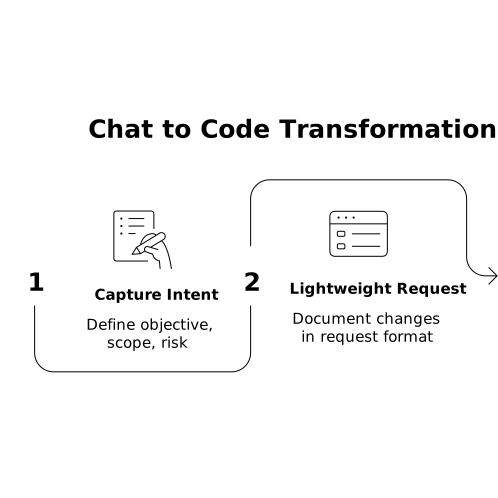
Then paste the key chat instructions into the PR description later. This connects “why” (the request) to “what” (the code).
Define acceptance criteria the AI can’t hand-wave
AI can generate plausible UI and logic, but change control depends on testable statements. Examples:
- “Only admins can approve refunds; non-admins see a read-only status.”
- “Refund requests are logged with user_id, order_id, timestamp.”
- “The new button is hidden unless the flag is enabled.”
Step 2: Generate changes in a branch, not on main
Use GitHub as the source of truth
Whether you start with a template or a prototype, the goal is to keep production changes flowing through pull requests. With a GitHub-synced setup, you can:
- Create a feature branch per change request.
- Commit AI-generated edits as regular code changes.
- Let engineers review diffs instead of trusting screenshots.
This is where AI speed becomes safe: the AI helps you implement, Git enforces discipline.
Keep commits readable
Small, focused commits are easier to review and revert. A practical pattern is:
- Commit 1: schema changes (migrations) and types
- Commit 2: API and business logic
- Commit 3: UI and copy
- Commit 4: flag wiring and analytics/audit events
Even if the AI generated everything in one pass, you can still stage and commit logically.
Step 3: Make PR previews mandatory for UI and workflow changes
Preview environments catch what diffs miss
Pull request diffs are great for logic, but product teams need to click through the actual experience. PR previews (temporary environments built from the branch) turn review into something concrete:
- Design review on real pages, not static mocks
- QA against real routes and forms
- Security review of permissions in the running app
For AI-generated apps, this is especially important because changes can touch multiple layers at once (React UI, Supabase policies, queries, and edge functions).
Use a PR checklist that matches real risk
Keep it short, but non-negotiable:
- Data: migrations reviewed; backfill plan documented if needed
- Auth: role checks and row-level security confirmed
- UX: empty states, loading states, error messages verified
- Observability: logs/metrics added for the new path
- Rollback: flag off returns app to safe behavior
Step 4: Put every risky change behind a feature flag
Flags are your safety valve
Feature flags let you ship code without immediately exposing it. In practice, that means you can merge and deploy while still controlling who sees the change. Use flags for:
- New workflows (checkout, billing, onboarding)
- Permission model changes
- Performance-sensitive features (heavy queries, real-time feeds)
- Anything that changes persisted data shapes
Choose a flag strategy that fits the app
There are three common approaches:
- Environment flags: enabled in staging, off in prod until approved.
- Role-based flags: enabled for admins/internal users first.
- Percentage rollout: gradually ramp from 1% to 100%.
For many internal tools, role-based flags are the simplest: your team uses the new feature first, then you expand access.
Design your code to fail safe
A feature flag should not just hide UI. It should protect the backend too. Practical rules:
- Guard API routes and mutations with the flag check.
- Keep existing behavior intact when the flag is off.
- Ensure database writes are compatible (or isolated) until rollout completes.
Step 5: Add audit logs that answer “who did what”
Audit logs are not the same as app logs
Application logs are for debugging. Audit logs are for accountability and compliance. A useful audit event typically includes:
- Actor (user_id, role, org_id)
- Action (created_refund_request, changed_role, updated_policy)
- Target (record id, table/resource)
- Timestamp and source (UI, API, automation)
- Before/after snapshot for sensitive fields (where appropriate)
Even for non-regulated products, auditability reduces mean time to resolution when something unexpected happens after a fast AI-driven iteration.
Log both configuration changes and business actions
In a change control workflow, two categories matter:
- Control plane: feature flag toggles, role changes, SSO settings, policy updates.
- Data plane: refunds issued, records deleted, exports created, approvals granted.
If your platform includes enterprise features like role-based access and audit logs, use them consistently so operations, security, and engineering share the same trail.
Step 6: Approve, merge, deploy, then release
Separate “deploy” from “release”
The most reliable pattern is:
- Approve PR after preview review and checklist completion.
- Merge and deploy with the feature flag still off.
- Release by turning the flag on for a small group.
- Ramp up based on metrics and support feedback.
This keeps production stable while still letting you move quickly.
Document the release decision
In the PR (or your change log), record:
- Flag name and default state
- Who approved the release
- Exact rollout plan (roles/percentage and timing)
- Rollback trigger (what metric or issue turns the flag off)
Step 7: Close the loop with post-change review
Make the workflow self-improving
After the flag reaches 100% (or the intended audience), do a short post-change review:
- What did the AI generate well, and what needed manual correction?
- Did the preview environment catch issues early enough?
- Were audit events sufficient to explain what happened in production?
- Can the next change request template be improved?
This keeps AI-assisted development from becoming a pile of untraceable “magic changes,” and turns it into an engineering-grade delivery system.
Where Lovable fits in this workflow
A chat-first builder is most effective when it doesn’t trap you in a black box. The practical advantage of using a platform like Lovable is that you can iterate conversationally while still landing changes in a standard stack and a GitHub-based review process. That makes PR previews, feature flags, and audit logs feel like a natural extension of fast prototyping—rather than a separate “enterprise process” that arrives too late.
Frequently Asked Questions
How does Lovable support change control for AI-generated apps?
Lovable generates production-ready code on a standard stack and supports GitHub sync, so changes can flow through branches, pull requests, and review like any traditional app.
Why should I use PR previews when building with Lovable?
PR previews let stakeholders and QA validate the actual running experience—UI, permissions, and workflows—before a change merges, which is crucial when AI edits multiple layers at once.
What should I put behind a feature flag in a Lovable project?
Use flags for new workflows, permission changes, performance-sensitive features, and any update that affects persisted data or user access, so you can deploy safely and release gradually.
What’s the difference between logs and audit logs in a Lovable-based app?
App logs help debug errors and performance. Audit logs record accountable actions—who did what, to which record, and when—supporting security reviews and compliance needs.
How do I roll back a bad release if I’m using Lovable?
Keep risky features behind a flag and design for safe-off behavior in both UI and backend. If metrics or support reports indicate issues, disable the flag to stop impact while you fix forward in a new PR.